Sign up for a free evaluation account
Text Download ➞
✕
Title Subtitle Download ➞
✕

NoviSign Digital Signage Software

All You Need to Know to Create, Manage, and Scale Your Screens

Create, schedule, and broadcast content to any screen, anywhere, in real time. Create content faster with NoviSign Studio AI and manage your entire screen network from one powerful digital signage management software platform.
Powering tens of thousands of screens for organizations worldwide

What is Digital Signage Software?

A Simple explanation

Digital signage software is a cloud-based system that lets you create, manage, and display content on screens from one dashboard, in real time. It replaces printed posters and static signs with displays you manage remotely.

It gives you full control over what appears on every screen, across locations, devices, and screen groups, without physical access to the screens.

What you can display:

Sale 2

Marketing messages and promotions

Group 11248

Menus and pricing

Bar Chart 2

Dashboards and KPIs

Loudspeaker

Internal communications

Right 9

Wayfinding and Interactive Kiosk

Play

Live data, videos, and social feeds

Everything is managed remotely through a web browser, making digital signage software scalable, flexible, and easy to control.

NoviSign Studio AI

Whatever you need.
Any industry.

Create AI-powered digital signage in seconds with NoviSign's free AI Generator!
Turn my idea into a screen
Free for 30 days. No credit card required.

How it Works: Create → Schedule → Display

Digital signage software follows a simple three-step workflow:

Create

Design content using a visual editor and with Studio AI. Add images, videos, text, dashboards, or templates.

School Clock

Schedule

Control when and where content appears by time of day, location, screen group, or audience.

Display

Content is automatically delivered to players and screens over the internet and plays exactly as scheduled.

This workflow allows marketing, IT, HR, and operations teams to collaborate efficiently, each with defined roles, without technical complexity.

Cloud-Based Digital Signage vs. Local Playback

Cloud

Modern digital sign software and display signage software platforms like NoviSign are cloud-based, meaning:

  • Content is managed through a secure web dashboard
  • Updates can be pushed instantly to any screen, anywhere
  • No on-premise servers are required
Notebook

At the same time, NoviSign supports local playback with offline failover:

  • Content is cached on the player
  • Screens continue playing even if the internet connection drops
  • Updates resume automatically once connectivity is restored

This hybrid architecture ensures reliability, scalability, and uninterrupted screen performance.

Who Uses it?

Digital signage software is used across nearly every industry and supports a wide range of digital signage applications, including:

Bad 4

Hotels & QSR

Digital menus, promotions, guest information, real-time pricing

Briefcase 2

Corporate & Offices

Internal communications, dashboards, visitor information

Hospital 1

Education

Campus announcements, schedules, emergency alerts

Natural History 1

Healthcare

Queue management, patient information, health messaging

Bank 2

Banking & Finance

Rate boards, campaigns, branch communication

Group 12876

Transportation & Public Spaces

Wayfinding, schedules, advertising

Whether it’s one screen or thousands, signage software provides a centralized and scalable visual communication platform.

Why it matters

Improve Communication & Engagement

It replaces static posters, emails, and notice boards with content you can update in real time. Screens capture attention, improve message visibility, and ensure timely communication with employees, customers, and visitors.

From promotions and announcements to dashboards and safety messages, digital signage turns communication into a constantly updated experience.

Real-Time Updates from Anywhere

With cloud-based management, you can change your content instantly from anywhere in the world. Prices, menus, announcements, promotions, dashboards, and alerts can all be updated in seconds across one screen or thousands.

This means:

  • No waiting for local staff
  • No manual updates
  • No delays

When something changes in your business, your screens change with it.

Group 16269
Screenshot 2025 12 31 at 2 07 20 PM

Save Time & Reduce Costs

Digital signage dramatically reduces the time and cost associated with traditional printed signage. There’s no need for recurring printing, shipping, installation, and manual replacement.

With NoviSign:

  • One design can be reused and modified endlessly
  • Content updates take minutes instead of hours or days
  • Campaigns can be automated instead of managed manually

The result is lower operational costs, faster execution, and higher efficiency.

Works at Scale – From 1 Screen to Thousands

NoviSign is built to scale effortlessly. You can start with a single screen in one location and grow to hundreds or thousands across cities, countries, and regions using the same platform.

Centralized management allows you to:

  • Control content by location, region, or screen group
  • Apply global updates instantly
  • Maintain full visibility and control over your entire display network

Your digital signage grows together with your business.

Screenshot 2025 12 31 at 2 02 42 PM

What NoviSign does

NoviSign is a cloud-based digital signage management software platform that enables organizations to create, manage, and broadcast content across any number of screens, securely and at scale.

The platform is built from three core layers:

NoviSign Studio (CMS)

A web-based, drag-and-drop editor where you design and manage all your content

NoviSign Player App

The playback application installed on your media players or smart displays (SoC)

Group 16325

NoviSign Cloud

The secure infrastructure that connects everything together and delivers content to your screens worldwide

From one central dashboard, you control your entire digital signage network, including content, schedules, devices, users, and data.

What Problems NoviSign Solves

NoviSign replaces outdated, manual, and fragmented signage processes with a single, unified system.
It solves key challenges such as:

  • Content that becomes outdated too quickly
  • Manual updates that require on-site intervention
  • Multiple locations that need centralized control
  • Complex integrations that don’t talk to each other
  • Screens that go offline without visibility
  • Marketing, IT, and operations working in silos

With NoviSign, updates are centralized, automated, and reliable. Teams work faster, screens stay current, and visibility is maintained across the entire network.

Key Differentiators vs. Competitors (Easy, Secure, Scalable)

NoviSign combines ease of use with enterprise-grade depth, making it a smart digital signage software solution designed for automation, security, and scale.

Easy to Use

NoviSign Studio requires no design or technical background. Anyone can create professional content from a simple prompt with Studio AI or use drag-and-drop tools and templates.

Design Mug

Secure by Design

 Security is built into the platform at every level, from cloud infrastructure and user access to content delivery and player communication.

Group 11771

Built for Scale

NoviSign supports everything from a single screen to large enterprise deployments with thousands of endpoints, without changing platforms or architecture.

Hardware Agnostic

Works with a wide range of players and displays, giving you full freedom of choice and protecting your hardware investment.

 Group 12027

Enterprise-Ready

API access, role-based permissions, monitoring, reporting, and automation tools make NoviSign suitable for global organizations with complex requirements.

Group 16343

At its core, NoviSign combines simplicity for users with depth for IT and enterprise environments without compromise.

Platform Components / Features

Studio CMS (Drag & Drop Editor)


NoviSign Studio is the web-based CMS where all content is created and managed. The drag-and-drop editor makes it easy to design, update, and control content across all screens from one place.

Widgets & Templates

NoviSign offers a wide range of widgets and ready-made templates for building dynamic, data-driven digital signage content quickly.

Scheduler & Playlists

Control exactly when and where content plays using playlists, time-based scheduling, and automated rules for different screens and locations.

Digital Signage Player (Multi-OS & TV Support)

The NoviSign Player ensures smooth and secure playback across a wide range of devices, making it an ideal digital signage TV software for commercial and enterprise environments.
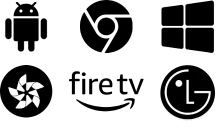
Supported platforms include Android, Chrome OS, Windows, Samsung Tizen, LG webOS, BrightSign OS, Linux, and Amazon Signage Stick.

Hardware & Deployment Options

NoviSign is completely hardware agnostic, giving you full freedom to choose the devices, screens, and installation methods that fit your project and budget. The platform works with existing hardware or new installations, supports System-on-Chip displays as well as external media players, and never locks you into a specific vendor, device, or operating system. NoviSign does not sell hardware, ensuring long-term flexibility for any deployment.

Monitoring Dashboard

Monitor your entire signage network in real time, including screen status, playback, and player health.

Reports & Proof-of-Play

Access detailed reports and proof-of-play data to verify content delivery and support performance tracking.

Through APIs, AI, sensors, and live data feeds, NoviSign enables intelligent, automated content updates, turning screens into responsive, data-driven communication tools.

With NoviSign integrations you can:

API & Webhooks

Connect NoviSign to your own applications, CRM, ERP, ticketing systems, and custom workflows for automated content updates

AI Content Creation & Automation

Generate text and visuals automatically using AI, speed up content creation, and adapt messaging dynamically based on data or context

POS & Business System Integrations

Sync menus, prices, promotions, and availability directly from your POS or back-office systems. For example, NoviSign integrates with Toast to display live menus and pricing for QSR, restaurants, and hospitality

Room Management & Booking Systems

Integrate with room and meeting management platforms such as Amadeus to display: Meeting Rooms Availability, Conference schedules, Guest and event information, Trade show and venue room assignments – This is ideal for hotels, convention centers, offices, and large organizations

Data Dashboards & Feeds

Display real-time dashboards and KPIs from: Power BI, Google Spreadsheets, Excel, JSON/XML Feeds, Internal Databases

Sensors, IoT & Event Triggers

Change content automatically based on real-world events such as motion sensors, RFID, barcode, queue systems, cameras, buttons or third-party triggers

Live Data Sources & External Platforms

Pull content from external services like weather, news, traffic, finance, internal systems, and more

These integrations turn your screens into live, responsive communication tools that react to data, events, and business activity in real time without manual updates.

How to Install & What You Need

Getting started with NoviSign is simple and fast. You choose your hardware, install the player, connect it to your account, and start displaying content.

Notebook

Choose Your Hardware

Select the display and player that fit your needs. NoviSign works with a wide range of devices, so you’re free to choose what’s right for your project.

 Group 16340

Install the NoviSign Player App

Install the player app on your chosen device.

 Group 16340
Male Circle 1

Connect to Your Account

Pair the player to your NoviSign account using a simple connection code.

 Group 16340

Create & Publish Content

Go to the Studio, create your content, assign it to your screens, and publish.

Check 2

What You Need?

A screen, a supported media player or SoC display, Internet connection and a NoviSign account

From setup to live screens, everything can be running within minutes.

Screenshot 2026 02 16 at 7 48 35 PM

Our Expertise – Why NoviSign

NoviSign is built on years of hands-on experience in real-world digital signage projects. We don’t just provide software. We deliver a proven, secure, and scalable platform that organizations rely on every day.

With NoviSign you benefit from:

More Than 15 Years of Experience

Deep knowledge of digital signage across industries, use cases, and global deployments.

Security, Stability & Compliance (SOC 2 Type II)

Enterprise-level security with proven stability for nonstop operation, with no black screens and no crashes.

Global Deployments & Multi-Language Platform

Thousands of screens deployed worldwide with full multi-language support for international teams.

Hardware Agnostic – Plug & Play Freedom

Works with any supported player or display. You choose the hardware, model, and installation method.

Seamless Content Updates & Automation

From dashboards and data feeds to playlists and triggers, your screens stay fresh automatically.

Easy for Non-Designers

Drag-and-drop templates, brand assets, scheduling, and live data, with no design skills needed.

Reliable, Global Support with Real Human Communication

Global support by phone or email, local channel partners, and direct communication with our team when you need it.

Cloud-Based with Local Playback Fallback

Central cloud control with reliable local playback even during internet disruptions.

Testimonials

University of Florida

"Our previous CMS was Xibo as well as 15 other flavors across campus and we moved away from that because it was just too complicated. That’s what NoviSign was great at. They’re just very simple and a great intuitive UI“

Chris Holder IT Manager
Appalachian Regional Healthcare

“The biggest improvement we’ve seen using NoviSign is the awareness we’ve created internally within our workforce.“

LeeAnn Mcintyre IT Manager
Blake's Lotaburger

"We were able to give a tutorial style of advertisement by using the NoviSign Board to show how our cold brew is made. We saw a huge uptick in sales. We sold cold brew for almost $1.5 million!"

Tiffany Bornmann Marketing Manager
MFM Health

"I know with NoviSign that the content is playing at all times and it’s easy to update, upload new content on the fly, from wherever I am."

Diana Giorlando Director of Marketing
University of Florida

"Our previous CMS was Xibo as well as 15 other flavors across campus and we moved away from that because it was just too complicated. That’s what NoviSign was great at. They’re just very simple and a great intuitive UI“

Chris Holder IT Manager
Appalachian Regional Healthcare

“The biggest improvement we’ve seen using NoviSign is the awareness we’ve created internally within our workforce.“

LeeAnn Mcintyre IT Manager
Blake's Lotaburger

"We were able to give a tutorial style of advertisement by using the NoviSign Board to show how our cold brew is made. We saw a huge uptick in sales. We sold cold brew for almost $1.5 million!"

Tiffany Bornmann Marketing Manager
MFM Health

"I know with NoviSign that the content is playing at all times and it’s easy to update, upload new content on the fly, from wherever I am."

Diana Giorlando Director of Marketing

Installations

Mask Group 113

University of Florida

Discover how The University of Florida (UF) employed digital signage campus-wide to dramatically improve its communication with students, staff, and alumni.

Mask Group 112

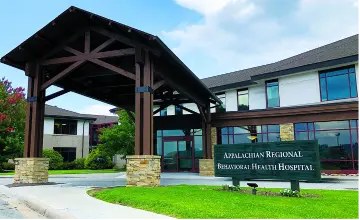
Appalachian Regional Healthcare

Learn how Appalachian Regional Healthcare implemented digital signage across its 14 hospitals and clinics to improve communication and enhance the patient and visitor experience.

Image 13

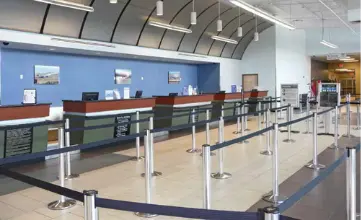
Laughlin Bullhead International Airport

Discover how Laughlin Bullhead International Airport in Arizona, USA, enhanced its charter service by deploying departure displays that provide precise flight and gate information, as well as weather forecasts for destination arrivals.

Signage Software FAQ

Most digital signage software today is cloud-based, and NoviSign is cloud-based only, with no on-premise option. You manage content in a web browser, and NoviSign handles updates, security and backups on Amazon Web Services (AWS). Each player stores content locally, so screens keep playing if the internet drops and update again when the connection returns. Live content, such as YouTube videos, still needs internet. On-premise systems run on your own servers, and your IT team must install and maintain them.

To run digital signage software, you need a screen, a media player or a smart display with a built-in player, an internet connection and a NoviSign account. NoviSign is hardware agnostic and sells software only. The NoviSign player runs on Android 5.0 and up, Windows 7 and up, ChromeOS, BrightSign, Linux, the Amazon Signage Stick, and commercial Samsung Tizen (4 to 7) and LG webOS (4 to 6 and 8) displays. Android is the recommended platform because it supports the most features.

Choose digital signage software by testing it on your own screens with the people who will use it. Check that non-designers can create and schedule content, that screens keep playing offline, and that the software supports the hardware and operating systems you already use. Also check security certifications such as SOC 2, whether it grows from one screen to many locations without changing platforms, and what support and training are included. NoviSign offers a 30-day free trial with no credit card.

Digital signage software is usually priced per screen, per month. NoviSign starts at $14 per screen per month, billed annually, with templates, scheduling, remote screen management, offline playback, reports, and setup assistance and training included. There are no setup fees. Very cheap or free tools often come with fewer features, weaker security and little support. Screens and media players are a separate cost, because NoviSign sells software only.

Free digital signage software is usually limited in time or features, while paid software includes ongoing maintenance, security, cloud backups, updates and customer support. Many “free” offers are trials of 14 or 30 days. A free service can also change its terms or stop working without notice, which is a risk for screens that run every day. NoviSign lets you test the full paid platform with a 30-day free trial, with no credit card required.

You create content in NoviSign Studio, a web-based editor where you drag and drop text, images, videos and widgets onto the screen layout. You can start from more than 200 ready-made templates for education, menus, healthcare, retail and other industries, or import designs from Canva and PosterMyWall. Free images and GIFs from Unsplash, Pixabay and Giphy are built in, and the AI Image Creator turns a short text prompt into a visual you can add to a screen.

Yes. NoviSign is SOC 2 Type II certified, with the audit done by EY, and it is GDPR-compliant. SOC 2 Type II is an independent audit that checks how a company protects customer data over time. NoviSign runs on Amazon Web Services (AWS) and encrypts data in transit and at rest. Account access is protected with single sign-on (SSO) through SAML 2.0, two-factor authentication (2FA) and role-based user permissions.

Yes. NoviSign Studio works in a web browser, with no coding and no servers to manage. You build screens with drag-and-drop tools and templates, then schedule them by time of day, date range or screen group. If you have used PowerPoint, the NoviSign editor will feel familiar. Every NoviSign license includes onboarding and training, and NoviSign also offers a help center and tutorial videos.

Get your free 30-day trial now Start here

NoviSign Digital Signage
Privacy Overview

This website uses cookies so that we can provide you with the best user experience possible. Cookie information is stored in your browser and performs functions such as recognising you when you return to our website and helping our team to understand which sections of the website you find most interesting and useful.