January 20, 2025

Studio Release 24

New Features and Enhancements

📺 Expanded Programmatic Advertising Integrations

This release expands NoviSign’s programmatic advertising capabilities with support for additional programmatic advertising platforms, following the same proven integration flow used with our existing partners.

Newly supported platforms include:
With these integrations, NoviSign players can:

  • Request programmatic ads from supported platforms
  • Render ad creatives on screens
  • Automatically fire impression and tracking events

These integrations are also available for white-label partners and significantly expand the range of programmatic ad demand sources that can be activated on NoviSign-powered screens, giving publishers more flexibility and monetization opportunities.


📱 New Device Added to Device Manager

We’re expanding Device Manager with support for an additional device, allowing users to perform basic device-level actions directly from the NoviSign Studio.

With this new device support, users can:

  • Reboot the device remotely
  • Mute and unmute device audio from the Studio

These actions help reduce downtime and eliminate the need for physical access to devices, making day-to-day maintenance simpler and more efficient for both customers and partners.

Note:
An updated Android APK supporting Device Manager actions for this device will be available shortly after the release, on demand, while final certification is completed—similar to the rollout process used in previous MDM-related updates.


Minor Bugs & Fixes

This release also includes minor bug fixes and performance improvements, including an improvement to Device Manager that ensures devices appear immediately after login for more accurate and reliable device visibility.

December 23, 2025

Studio Release 23

New Features and Enhancements

🔐 Single Sign-On (SSO) Signup via Google & Microsoft

Getting started with NoviSign is now faster and easier.

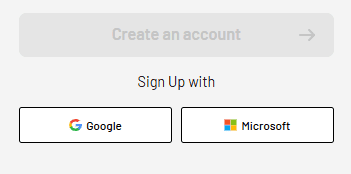
Users can sign up directly on the NoviSign website using Google or Microsoft single sign-on (SSO) with no additional forms or steps required
 

How it works:

  • Users choose Sign up with Google or Sign up with Microsoft on the NoviSign registration page
  • After authentication, they are automatically registered in the NoviSign Studio

This streamlined flow significantly reduces friction during onboarding, relies on familiar and trusted login methods, and ensures a consistent signup experience across both the website and the Studio. The result is a smoother first interaction that helps new customers start using NoviSign almost instantly.


🧭 Device Manager – Easier Device Management from the Studio

Device Manager provides a cleaner user experience that makes it easier to manage devices and understand how they relate to screens, while also enabling direct device-level control from the Studio.
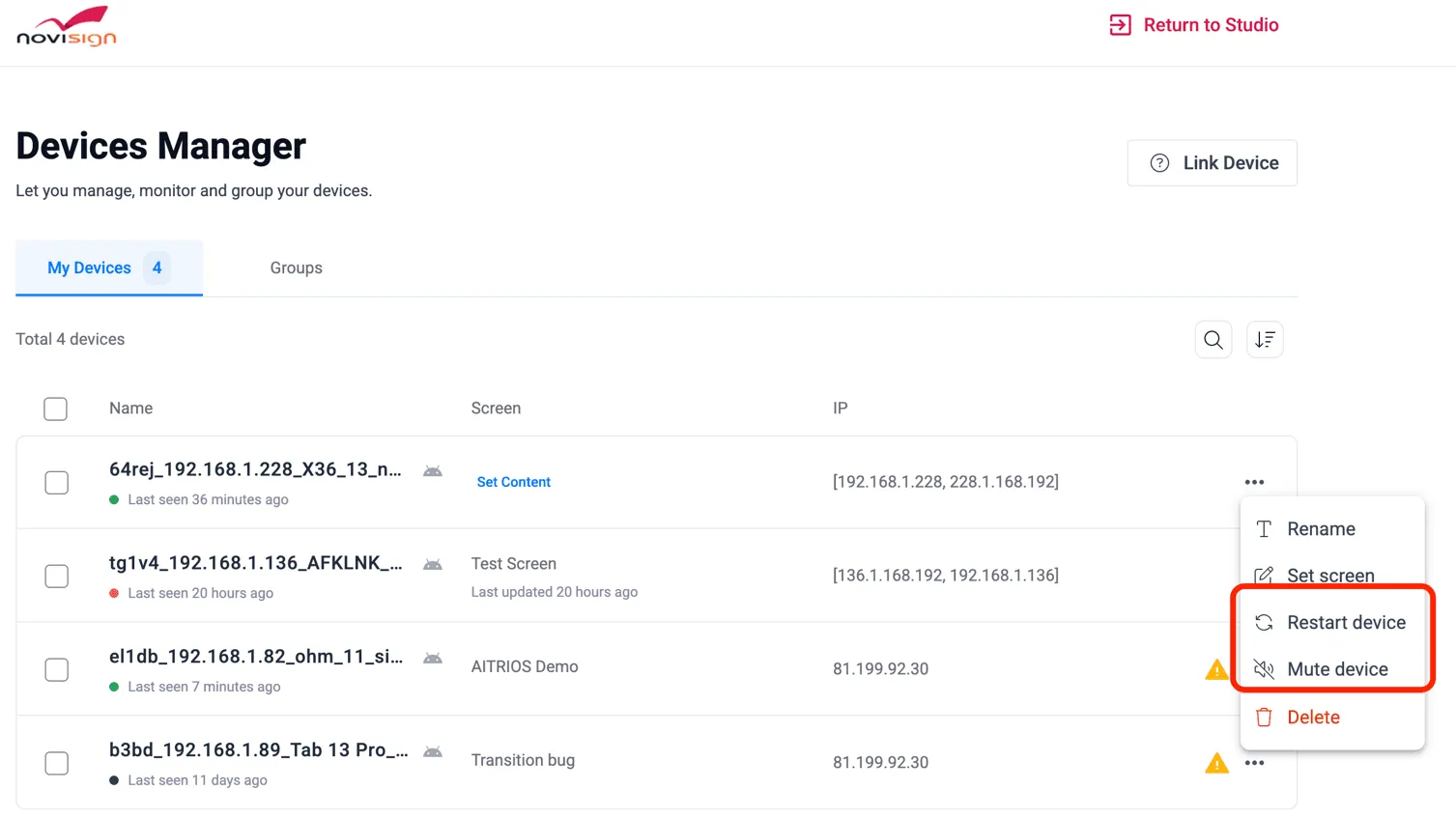
 

It simplifies the way users view, link, and manage physical devices based on remote commands, and allows certain management actions to be performed without relying solely on screen keys. Screens and devices are easier to navigate, clearly connected, and presented in a more familiar and organized structure.

What’s included:

  • A simplified Device Manager interface for clearer device and screen relationships
  • Improved linking and unlinking of devices to screens
  • Better visibility into which device statuses are active, inactive, or unsupported
  • A more organized screen view, with improved structure and navigation
  • Easier access to device management from the account menu
  • Support for MDM-based device actions such as reboot and mute/unmute directly from the Studio for supported devices
  • Ability to create device groups, allowing content to be managed and updated across multiple devices at the same time

These improvements make day-to-day device management more efficient for both customers and integrators, while also providing greater flexibility through direct device control. Device manager is especially valuable for users managing multiple devices who need clearer visibility, easier control, and less dependency on screen-based workflows.


📱 Expanded MDM Controls for Minix Devices

Device management for supported Minix rooted Android players has been enhanced with additional remote control capabilities.

New actions available include:

  • Remote device reboot
  • Mute and unmute device audio

These controls allow users to perform essential maintenance actions without physical access to the device, helping reduce downtime and simplify day-to-day operations. Partners and customers can respond faster to common issues while minimizing on-site maintenance and support efforts.

Note:
An updated Android APK supporting Device Manager + MDM will be available shortly after release, on demand, while final certification is completed.


🌐 Improved Configuration Support for HTML Players

HTML-based players now support Studio-level configuration, bringing them closer to the behavior and flexibility of Android players.

What’s new:

  • HTML players can receive basic configuration settings directly from the Studio
  • Custom API parameters defined via the API Integration settings can be applied to HTML players
  • Improved compatibility with professional hardware platforms and external player APIs

This update makes HTML players easier to set up and manage, improves consistency across different deployments, and offers more flexibility for custom integrations when needed.­

November 18, 2025

Studio Release 22

New Features and Enhancements

🧩 Two-Factor Authentication (2FA) – Now with SMS Support

Security just got even stronger! In addition to using an Authenticator app or email verification, users can now receive their 2FA login codes by text message (SMS), available only in supported regions.
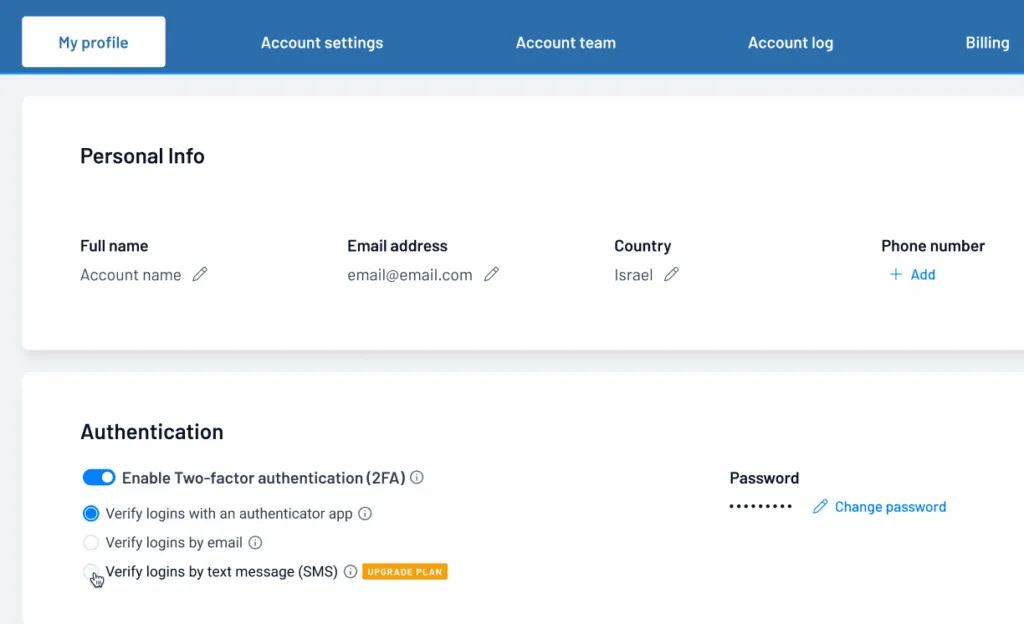
 

When signing into the Studio, simply choose to receive a short verification code straight to your phone. Enter that code to complete your login and keep your account secure.

Highlights

  • New SMS option alongside the Authenticator app and Email.
  • Easy setup directly from “My Profile” in the Studio.
  • Flexible management: Enable, reset, or switch methods anytime.
  • Available by plan and region where SMS delivery is supported.

A simple and reliable way to protect every account without requiring extra apps.


📨 Automated Player Status Alerts

A new automated reporting feature helps ensure screens are always active and connected. If a player doesn’t report back within 24 hours, the system automatically sends an email alert with the screen’s details and last active time.

To activate this feature, please contact support for initial setup and connection.

Key features:

  • Automatic email alerts for screens that go offline or change status.
  • Separate notification for each affected screen.
  • Status checks run automatically every few hours for accuracy.

This hands-free feature helps you stay informed and maintain reliable screen uptime without manual tracking.


📂 SharePoint-PowerPoint Integration

Managing and updating presentations has never been easier

Users can now upload PowerPoint files directly to a connected SharePoint folder, and the system will automatically sync, convert, and publish the updated content to playlists without any manual uploads or technical setup.

Note:
This feature requires a one-time setup to connect your SharePoint to the Studio. Please contact NoviSign support or your account representative for more information and setup.

Each PowerPoint slide is converted into a static image. Transitions or animations will not be displayed.

How it works:
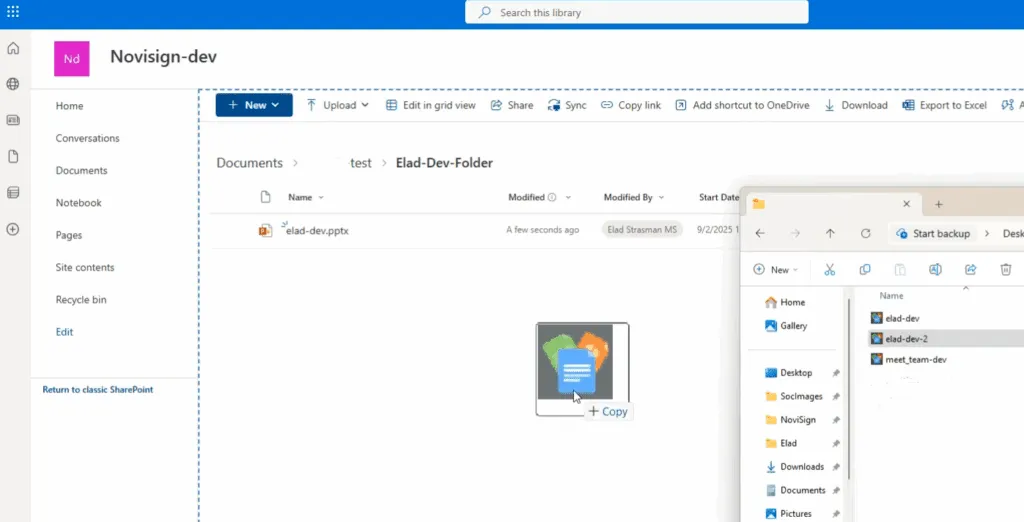
  1. Upload or update a PowerPoint (.PPTX) file in your designated SharePoint folder.
  2. The system automatically converts each slide into images and updates the related playlist in the Studio.
  3. Previous versions are replaced, ensuring the latest content is always displayed.
Uploading a PowerPoint to your SharePoint Folder
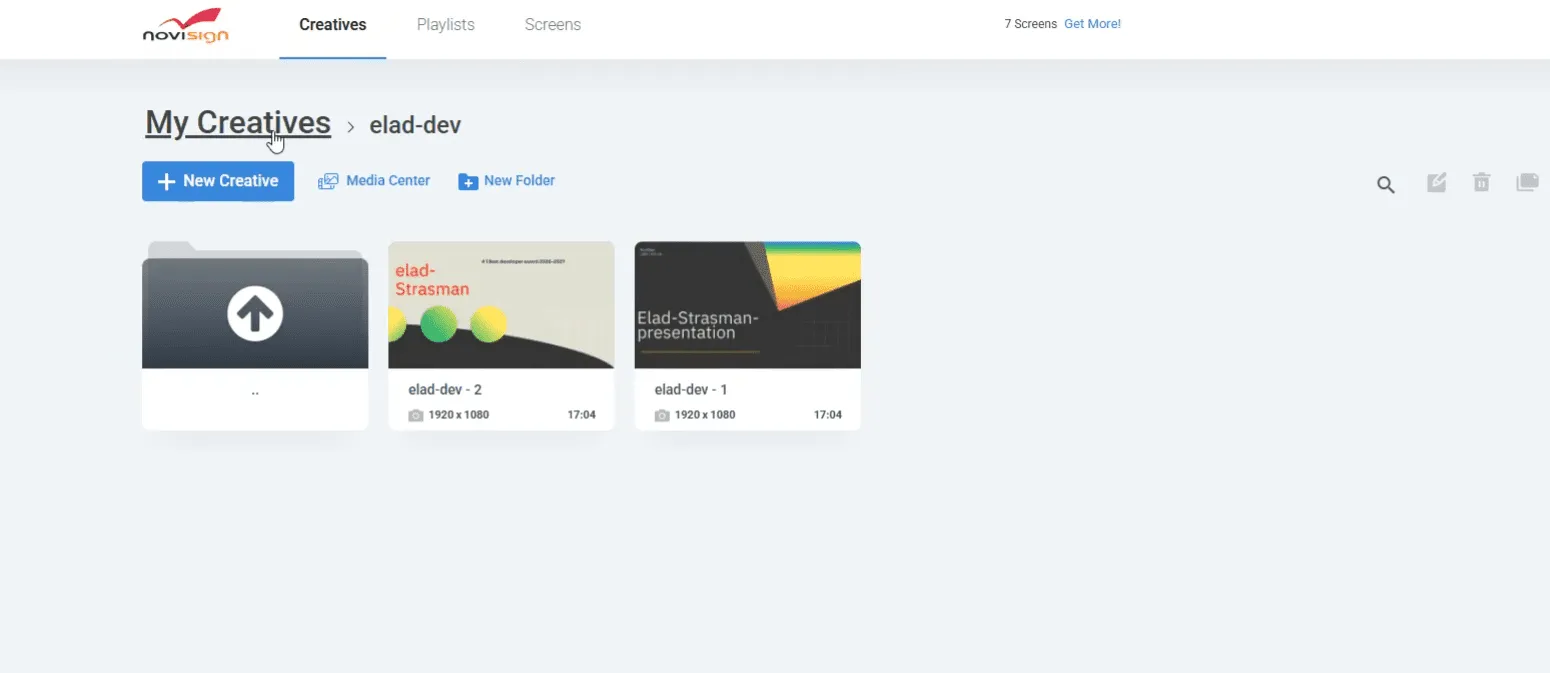
Uploading a PowerPoint to your SharePoint Folder

The system automatically converts each slide and updates the related playlist

The system automatically converts each slide and updates the related playlist

Benefits:

  • Automated flow from upload to on-screen display.
  • No FTP or manual syncing required.
  • Easy collaboration: multiple users can update the same file.
  • Consistent, up-to-date content across all screens.

A smooth and modern way to manage presentations that saves time and keeps displays current with minimal effort.

October 22, 2025

Studio Release 21

New Features and Enhancements

🛡️ Two-Factor Authentication (2FA)

Security takes a big step forward with the introduction of Two-Factor Authentication (2FA) for all partners and users. This adds a simple verification step when logging into the Studio, helping prevent unauthorized access and keeping every account safer.

With 2FA enabled, after entering your regular password you’ll be asked to confirm your identity in one of two ways:
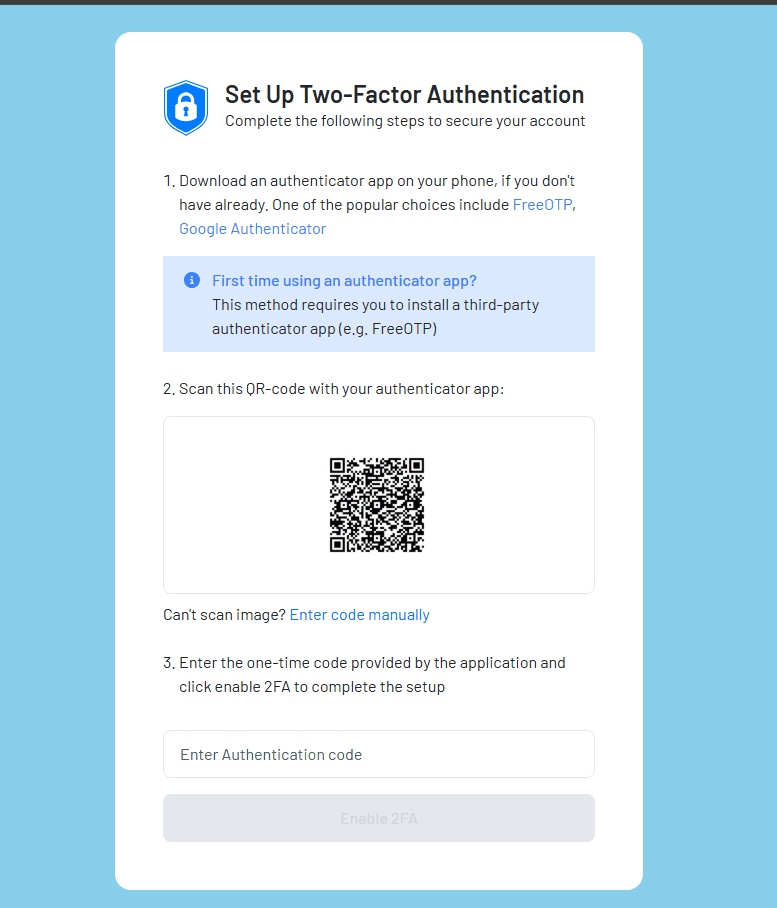
  • Authenticator app – use a free app like Google Authenticator or Microsoft Authenticator to generate a short code that changes every few seconds.
  • Email verification – receive a one-time code directly in your inbox and enter it to complete login.


Partners and Admins can enable or enforce 2FA across all users, choose the preferred method, and manage settings directly from the Admin Console.
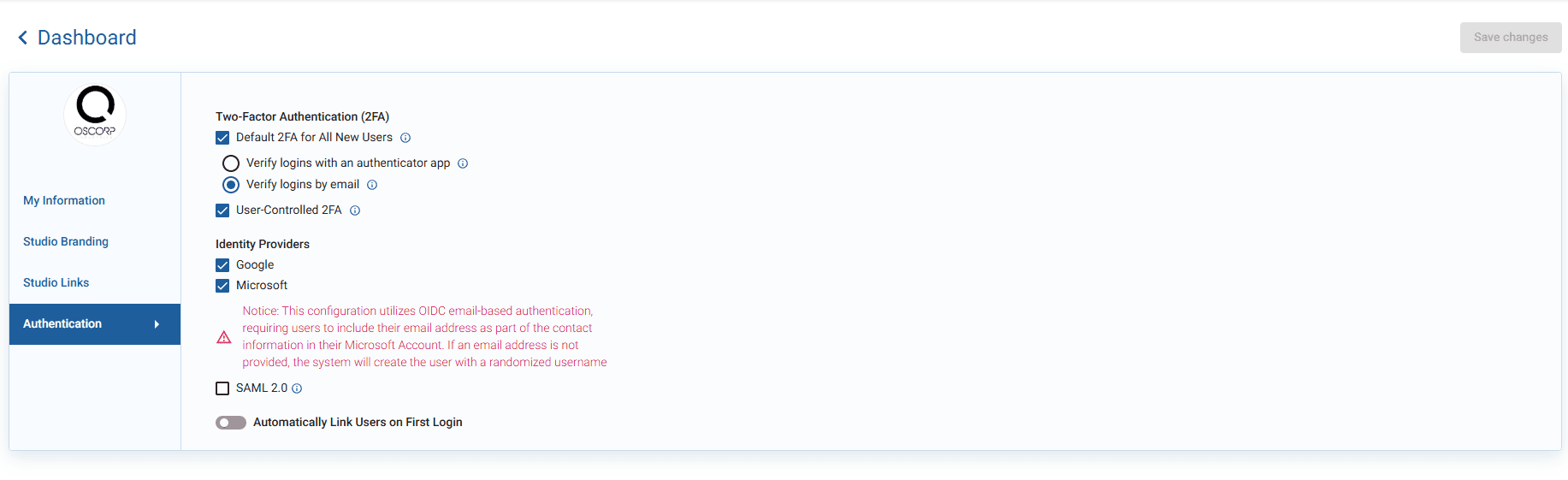
  • Option to set 2FA as default for new users
  • Simple reset and management controls for flexibility

A straightforward, reliable way to secure access without complicating the login process.


🔐 Stronger Password Security

We’ve enhanced password protection across the Studio Admin to align with the updated Studio policy.

What’s new:

  • Passwords must be at least 12 characters long
  • Must include letters, numbers, and a special character
  • Require both uppercase and lowercase letters
  • Updated password hints and validation on all related screens

This update makes sign-up and password management more secure while keeping the process simple and consistent across the platform.


🗺️ Amadeus UI Improvements

We’ve made configuring new Amadeus jobs smoother and more intuitive. When setting up a job in the Admin Console section, you’ll now see additional location-related data directly on screen.

This small but useful enhancement makes setup clearer and the overall experience more user-friendly.

September 16, 2025

Studio Release 20

New Features and Enhancements

🌤 Weather Widget 2.0 – Adjustments

Important: To use the new version of the Weather Widget, clients must have the latest version of the Android APK installed, APK v6.5.2.

  • Drag & drop onto your creative with ease.
  • A wide range of preset layouts for various screen sizes (Landscape & Portrait).
  • Simply search and select your location.
  • Activated forecast display (3/5 days) and current date.
  • Fonts, colors, and backgrounds can be customized to match your design.
  • Supports HTML and Android operating systems (Tizen and WebOS will be released later)

🗂️ Unified Page Headers & Icons

We’ve refreshed the Studio to look and feel more consistent across every page. Cleaner headers and updated icons give you a smoother navigation experience.

  • Consistent typography, spacing, and layouts across Studio.
  • Updated icons based on the design system for a modern, aligned design.
  • A cleaner button state, a more polished navigation experience.

Navigation feels cleaner and more intuitive, so you can focus on creating content instead of hunting for controls.

Before

After

🏷️ Smart Tag Management

Tags replace outdated description fields, giving you a faster way to organize and find your content. Managing creatives, playlists, and screens has never been easier.

  • Assign, edit, and remove tags across Creatives, Playlists, Screens and more.
  • Tags replace the old description fields, streamlining workflow.
  • Filter by tags using new tag filters in tables and lists views.
  • Case-insensitive tags ensure consistency across your account.

Finding and managing content is now faster and more reliable across your entire account.
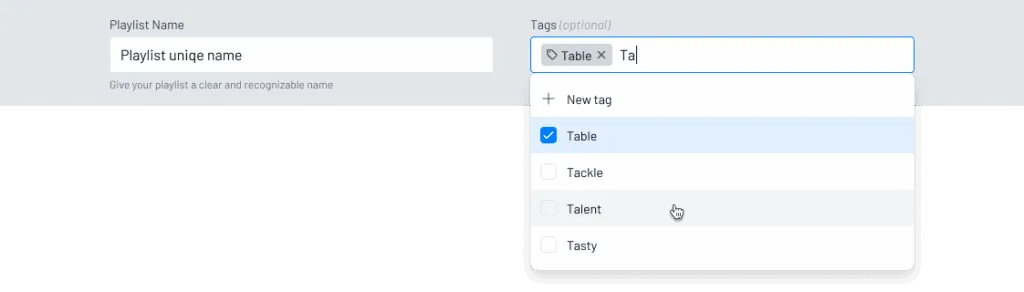
Adding tags

📢 Place Exchange Integration

NoviSign now supports Place Exchange as a new ad demand source, alongside TAIV and HiveStack. This opens more opportunities for monetizing your screens with dynamic ad campaigns.

  • Supports VAST and JSON ad requests with dynamic org ID and ad unit name
  • Impression tracking enabled via URLs in the VAST response
  • Sandbox setup is active for testing with approved creatives
  • Ongoing validation of impression/play match rates
  • API documentation available for implementation

A seamless way to expand your ad revenue potential while ensuring transparency and tracking accuracy.

August 24, 2025

Studio Release 19

New Features and Enhancements

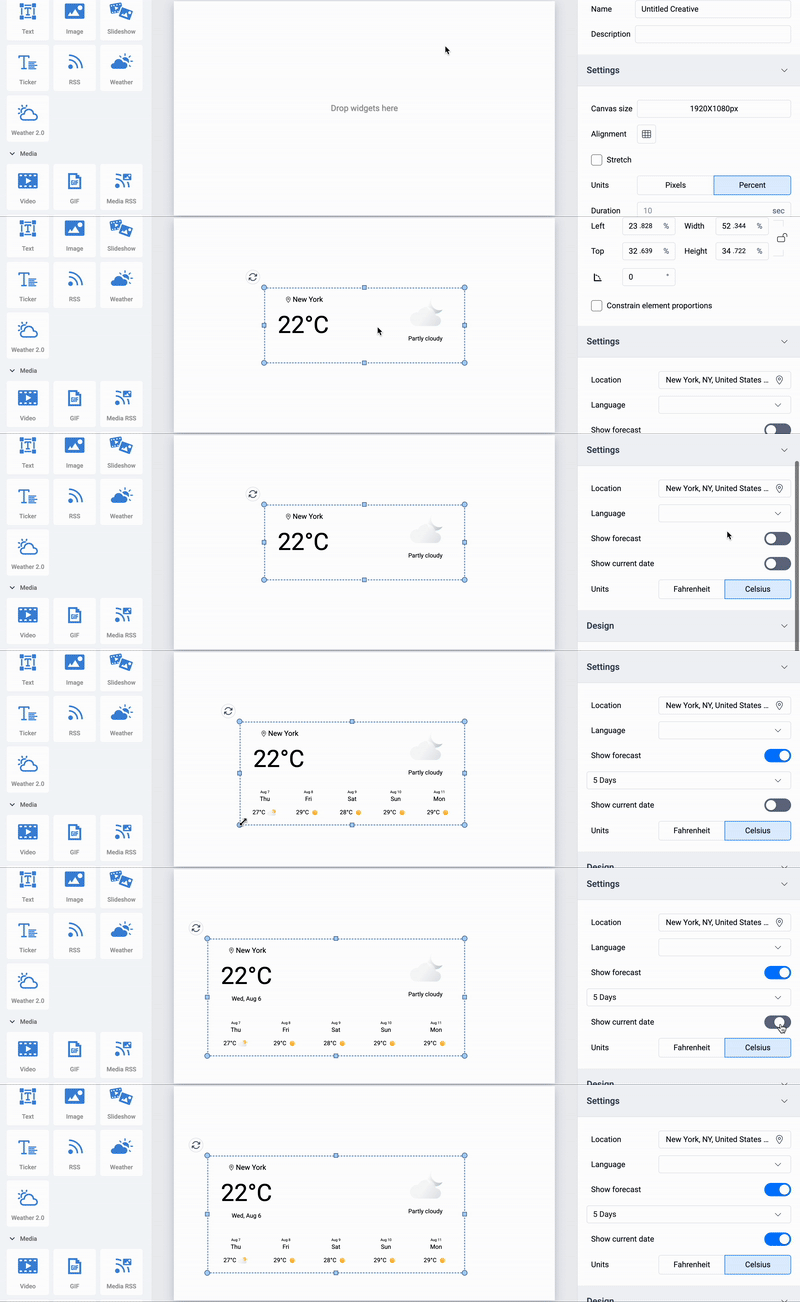
🌤 Weather Widget 2.0 – Forecasts Made Beautiful

Our new and improved Weather Widget is here!

  • Responsive design for any screen size
  • 5-day forecast support
  • Fresh, modern visuals to keep your content engaging

Bottom line: Your weather updates just got an upgrade.
 

Quicklink setup just got even easier!

  • Now fully supported on Amazon Digital Signage devices
  • Fast, simple setup – scan, connect, and start playing content in minutes

From unboxing to live content, faster than ever.

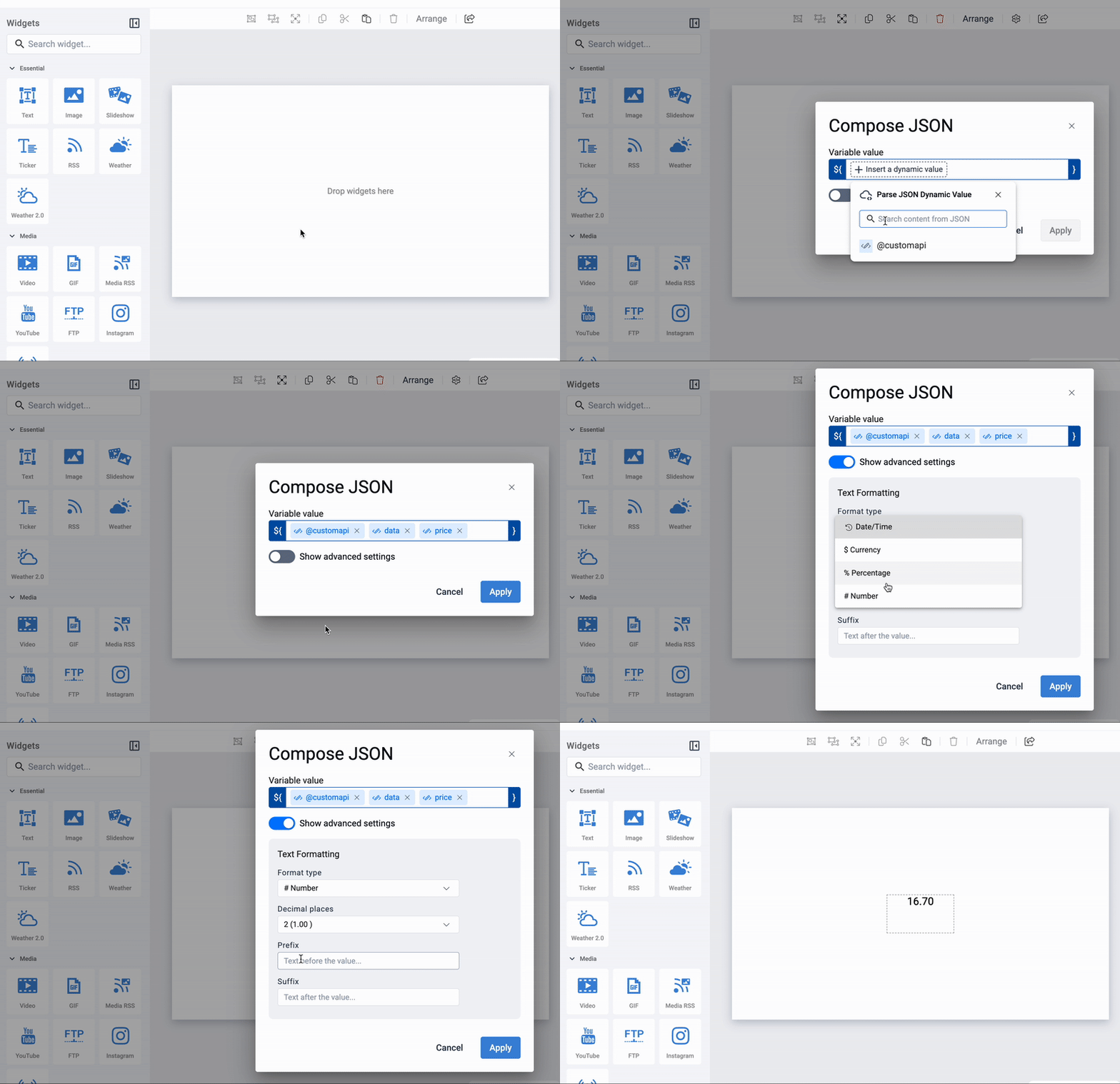
🔢 Formatted TextBox for Dynamic Properties

Transform your data into beautiful, readable content:

  • Display API-driven values as currency, numbers, or percentages
  • Control decimal places and formatting for a polished look
  • Perfect for dashboards, KPIs, and real-time feeds

Your data. Your format. Your style.


🎨 Studio Navigation Enhancements

No more click confusion! We’ve refined “Back” button behavior in the Studio:

  • Back now consistently takes you to the previous screen you came from
  • Example: From Screens → Open Playlist → Editing Screen, returning will take you back to Editing Screen

A smoother, more predictable editing experience.

🛠️ Minor Bugs & Fixes – Keeping Things Smooth

This release also includes minor bug fixes and performance enhancements to keep your workflow smooth and reliable.

July 18, 2025

Studio Release 18

New Features and Enhancements

🎯 Programmatic Just Got Supercharged!

Dynamic Parameters Now Live for TAIV &

Manage smarter, not harder. With support for dynamic parameters, you can now use a single creative and inject API keys, device names, and more directly from a central source—like Google Sheets.

No need to duplicate creatives. Just tweak your data, and go!

HTML Player + API = 🚀

You asked, we delivered!

The HTML Player now supports API access via configuration.

Just create a config, assign it to a screen, and the magic happens—even on HTML-based players.

Your custom integrations just found their new best friend.

🔐 SSO Made Simple

Single Sign-On (SAML) is now available!

Enterprise teams rejoice: you can now configure SAML-based SSO with Okta.

Simplify login, enhance security, and give your users a seamless authentication experience.

🛠️ Minor Bugs & Fixes – Keeping Things Smooth

This release includes various minor bug fixes and performance enhancements to keep everything running smoothly.


June 17, 2025

Studio Release 17

New Features and Enhancements

🔗 Connectivity & Integration

⚡ Zapier Integration is Live!

You can now connect NoviSign with thousands apps using Zapier!

Automate your workflows and trigger screen content updates directly from your favorite tools like Google Sheets, Slack, Calendly, and more.

➡️ Smarter automation. Seamless display. Limitless potential.
📝 Custom Sign-Up Page API

Create branded, personalized sign-up flows for your users with our new Custom Sign-Up Page API.

Perfect for partners and enterprise customers who need white-label onboarding or controlled access flows.

🏨 Amadeus Integration – Upgraded!

Our Amadeus connector now supports more events per venue, making it ideal for large properties with complex schedules.

Keep your displays accurate, up-to-date, and event-packed.

🧩 Usability & Studio Upgrades

🎛️ Layer Pane: Now with Hide & Show!

Design with precision. The Studio’s Layer Pane now supports Hide/Show toggles, making it easier to manage complex layouts with multiple widgets.

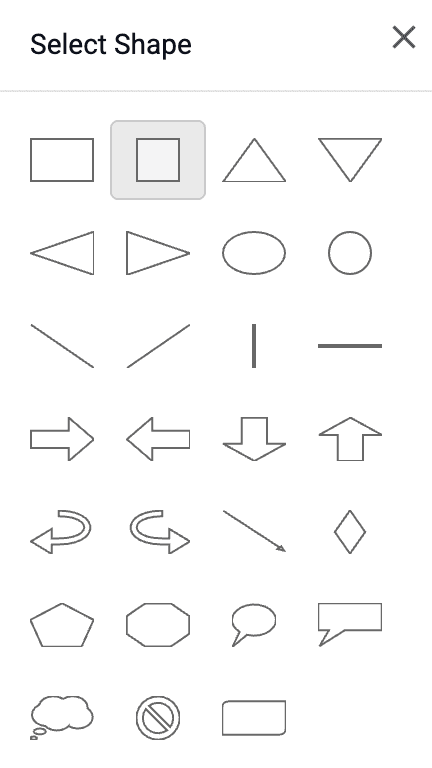
🔺 More Shapes = More Creativity

We’ve added new shapes to the Shape Widget – giving you more design flexibility to match your brand and messaging.
🛠️ Polish & Performance – Minor Fixes, Major Impact

  • Fixed issue where product plans in the studio didn’t match the website
  • Quicklink now supports auto-start playback
  • Other minor improvements and bug fixes.

🙌 A big thank you to our customers and partners for the reports and suggestions!

May 19, 2025

Studio Release 16

New Features and Enhancements

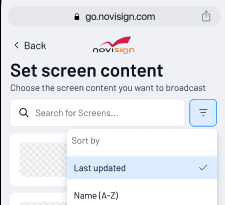
⚡ Quick Link – Rolling Out!

After a fantastic response to the preview release, Quick Link is now rolling out to Android devices! 🎉

Whether you’re setting up one screen or hundreds, Quick Link cuts down the hassle and helps you go live in no time.

We’ve listened to your feedback and added a Search Bar to make selecting screens faster and easier – even across large deployments.
 

📥 To get the Android APK, just reach out to our team at support@novisign.com

📖 Check out the setup guide & full details: Read More

💡 Your insights are shaping the future of Quick Link – keep them coming!

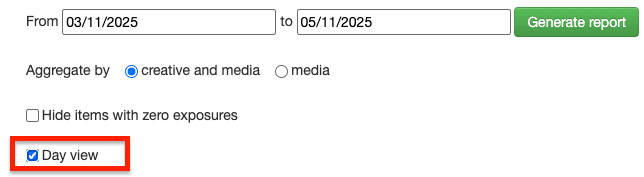
📊 Player Daily Performance Reports – Now with Day View!

Gain deeper insights into media performance with our new “Day View” option.

Instead of a single aggregated summary, you can now see a detailed daily breakdown for each screen within your selected date range.

Perfect for spotting trends, optimizing content, and reporting performance with precision:
🛠️ Polish & Performance – Minor Fixes, Major Impact

We’ve squashed bugs and fine-tuned the platform to ensure smoother, faster, and more reliable performance. Thanks to all customers and partners who reported issues – your input drives continuous improvement.


Apr 21, 2025

Studio Release 15

New Features and Enhancements

⚡Introducing Quick Link (Preview Release)

Say hello to Quick Link – our brand-new tool designed to simplify setup and supercharge content deployment!

Whether you’re setting up one screen or hundreds, Quick Link cuts down the hassle and helps you go live in no time.

🧪 Currently in preview – we’d love for you to test it out and let us know what you think!

📥 To get the Android APK, just reach out to our team at support@novisign.com

📖 Check out the setup guide & full details: Read More
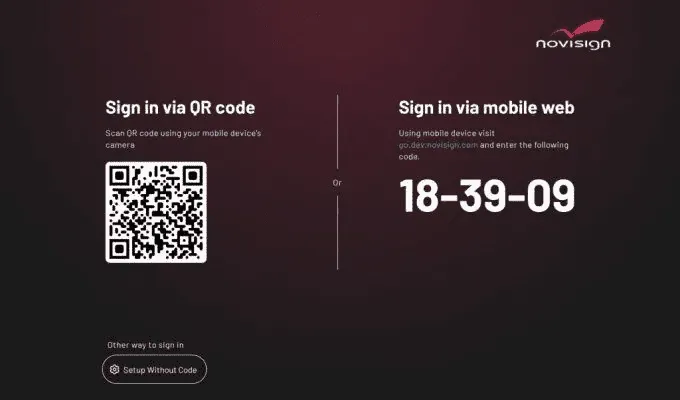
 

📊 Microsoft Clarity Integration

We’re thrilled to roll out support for Microsoft Clarity!

Now, partners can leverage Clarity’s behavioral analytics to:

  • Track user interactions
  • Discover usability trends
  • Optimize workflows and performance

It’s like having a magnifying glass on your user journey – so you can serve your customers better than ever.
🗂️Playlist Folders – Organize Like a Pro

Managing a ton of screens and playlists? We’ve got your back.

You can now create folders for playlists, making it easier to organize, search, and manage your content at scale.

Perfect for enterprise users or anyone juggling lots of content.
Bug Fixes & General Improvements

As usually, we improve our software and fix problems reported internally and by our customers


Mar 24, 2025

Studio Release 14

New Features

Usability Enhancements:

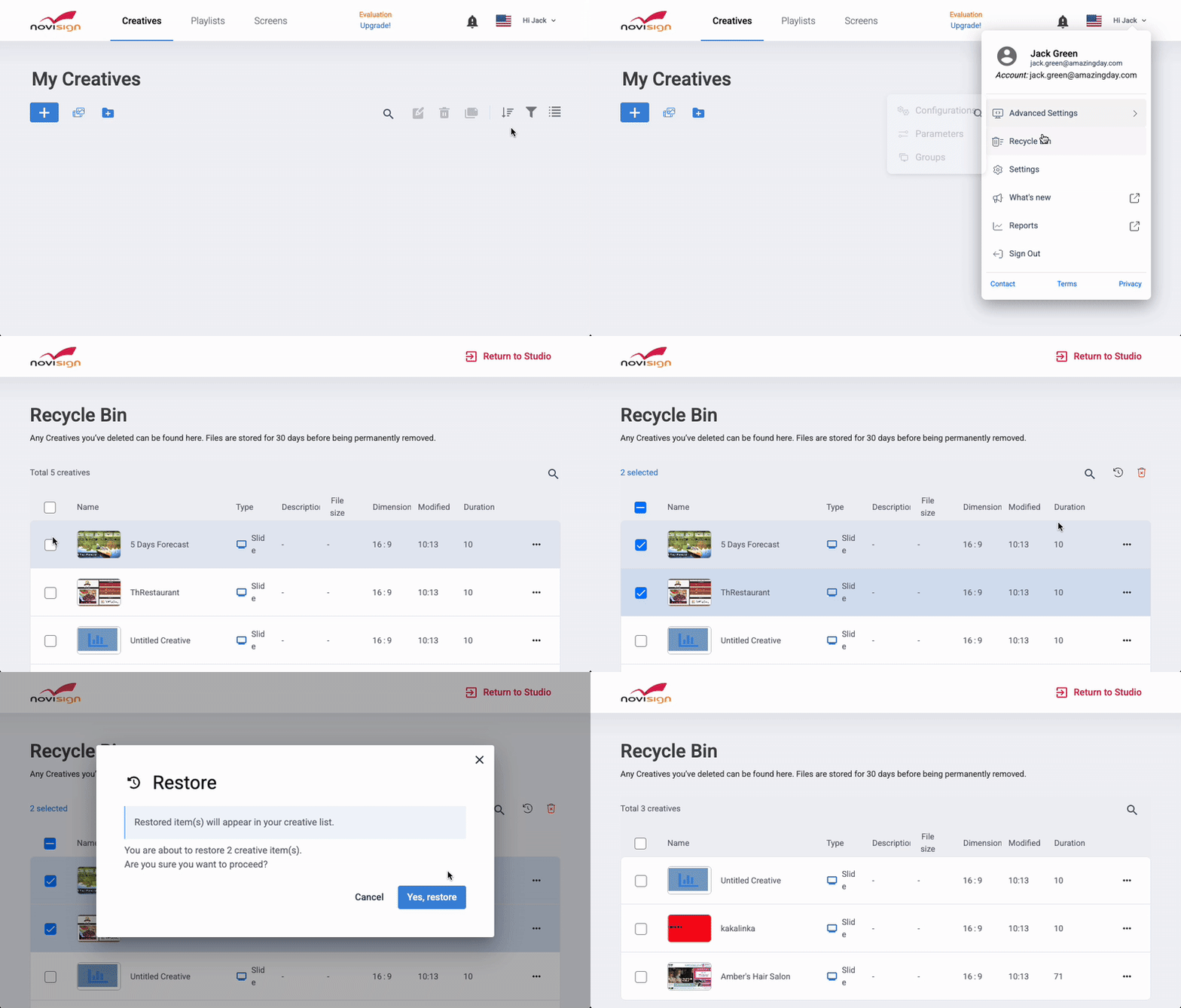
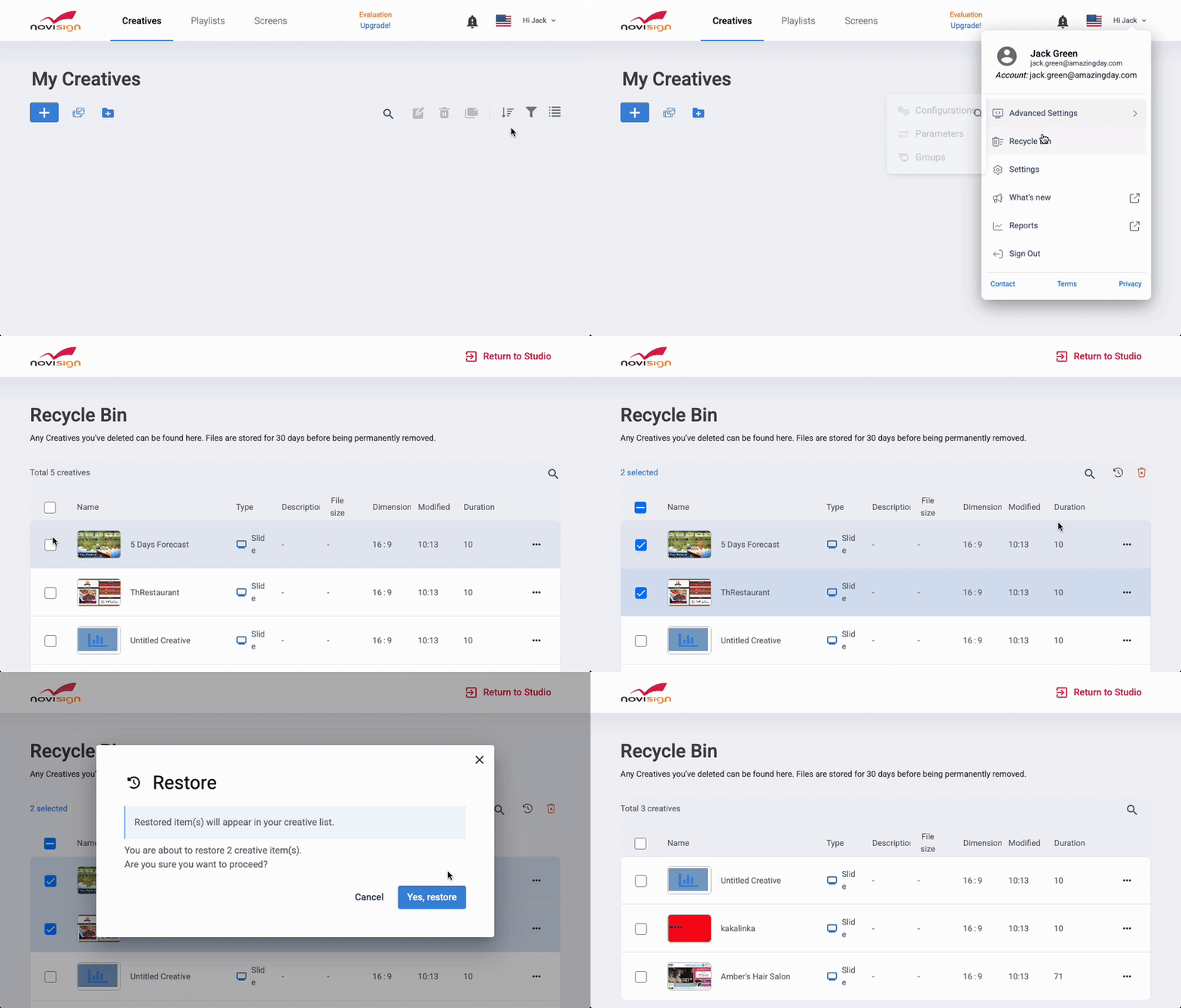
  • ♻️Introducing the Recycle Bin!Accidentally deleted a creative? No worries! With our brand-new Recycle Bin, you can now restore deleted creatives with ease. Deleted items will be safely stored for 30 days, giving you plenty of time to bring them back if needed. Say goodbye to accidental losses and hello to peace of mind!


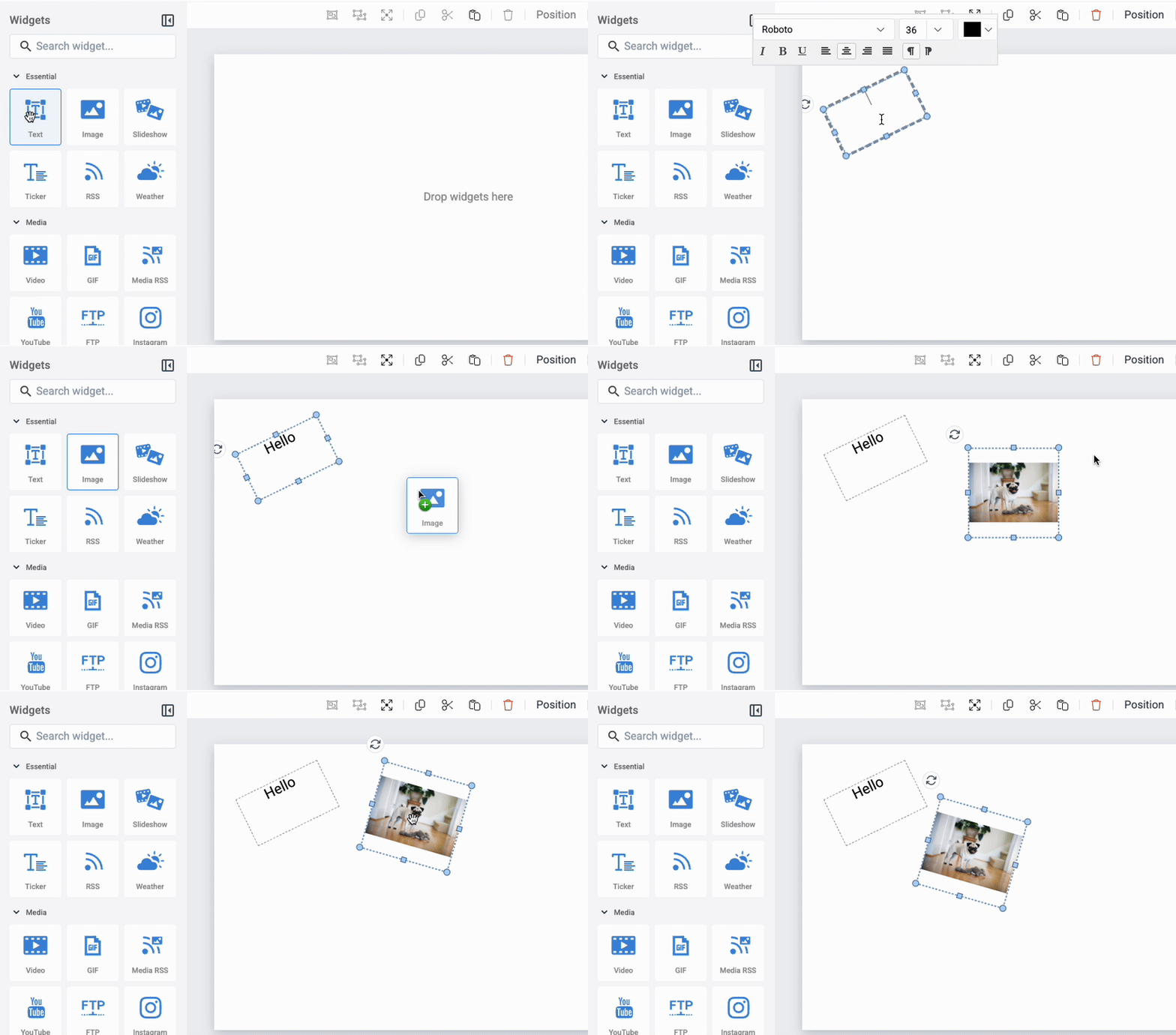
  • 🎨Composer Just Got Even Better!We’ve added widget rotation to the Composer, unlocking a whole new level of design possibilities. Now you can tilt, twist, and turn select widgets to create dynamic, eye-catching content like never before. Let your creativity run wild!

Bug Fixes & General Improvements

  • Download status can now be enabled in the reports upon request.
  • Reports in Local Time – No more timezone confusion! Reports can now be displayed in your local time, making it easier to analyze performance without the mental math.
  • Forgot your password? We’ve made improvements to the Forgot Password page, ensuring a smoother, hassle-free recovery process.

Feb 26, 2025

Studio Release 13

New Features

  • Usability:
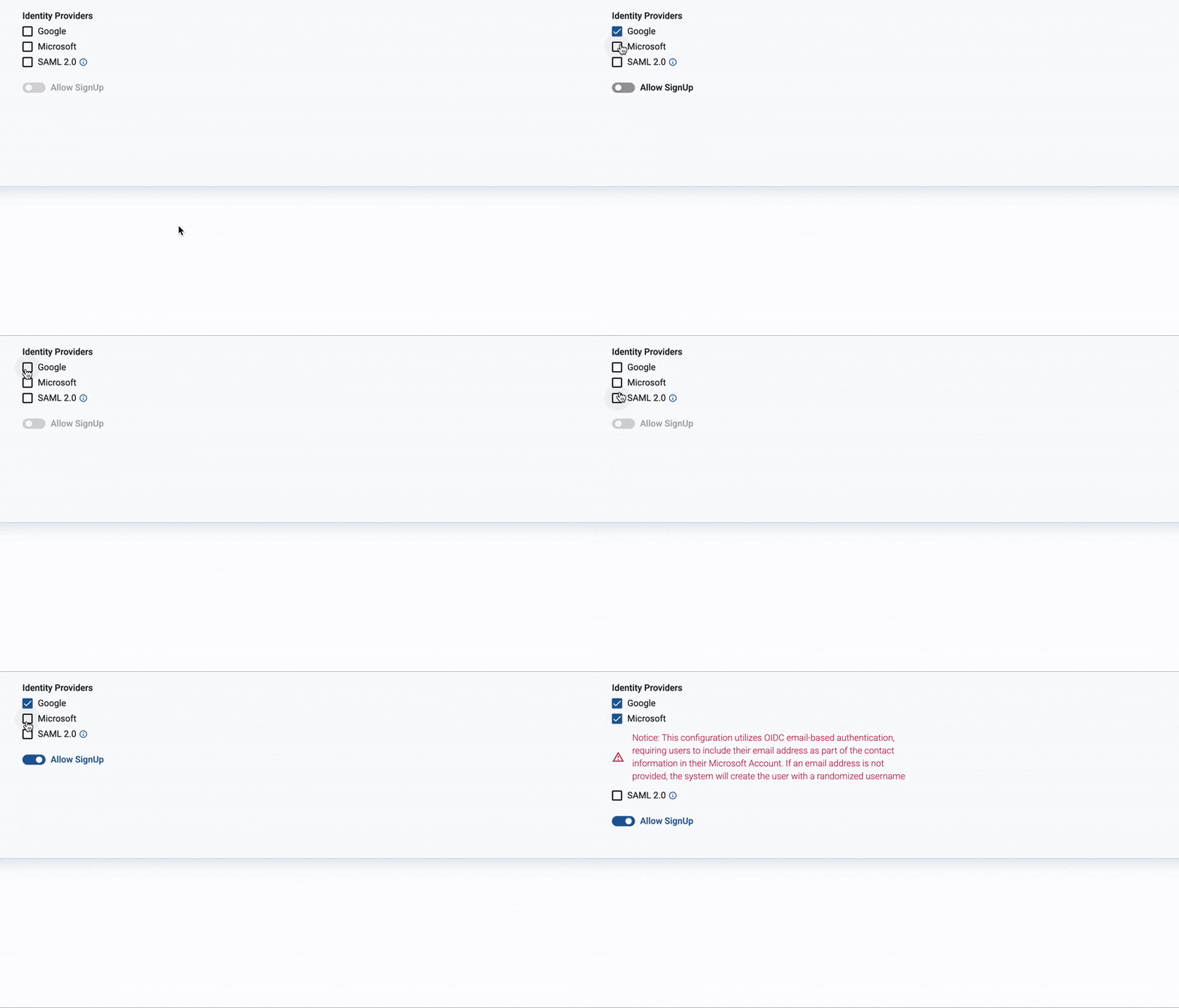
    • SSO Configuration Made Easy: Partners and enterprise users can now enable Single Sign-On (SSO) for Microsoft and Google directly from the admin panel.
    • Self-Serve SAML IDP Support: The admin console now supports self-service SAML IDP configuration, allowing seamless enterprise IDP connectivity for SSO.
    • Flexible User Management: Admins can now choose to allow or restrict new user sign-ups via SSO from the admin panel

    Composer Improvements:

    • Modernized Property Panel: The property panel has been redesigned with a modern look for a more intuitive user experience.
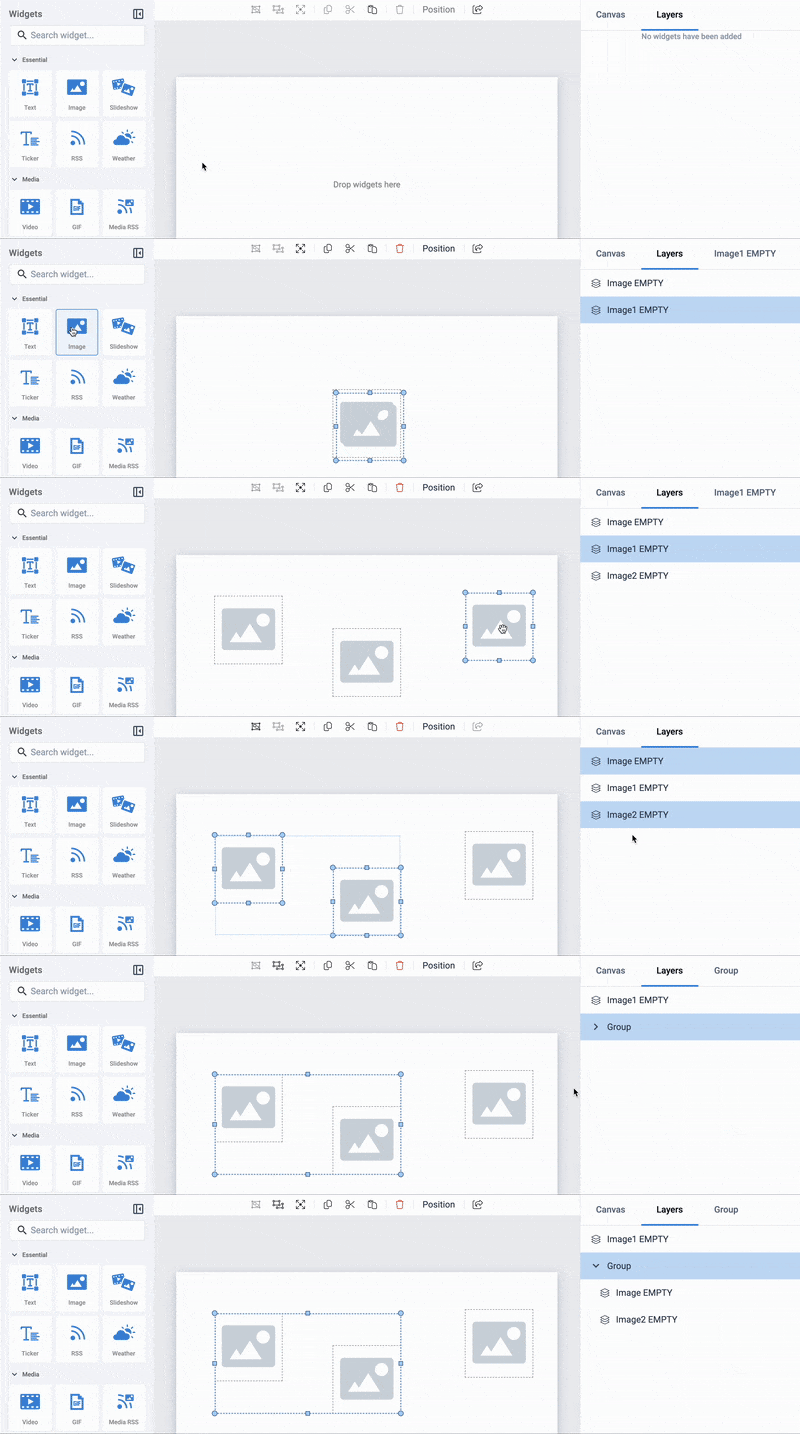
    • Enhanced Layer Management: Additional improvements have been made to the layer management system in the composer for a smoother workflow:
      • Group Layers: Users can manage a group of layers, collapse/expand groups, and reorder groups.
      • Visibility Toggling: A visibility icon next to each layer and group allows users to toggle visibility.
      • Bulk Actions: Users can select multiple layers and perform visibility, lock, and delete actions.
    • The Creative on the properties panel was renamed to Canvas

Bug Fixes & General Improvements

    • Improved Polish Translation: Enhancements were made to ensure a more accurate and natural Polish language experience.

Jan 27, 2025

Studio Release 12

New Features

  • Usability:
    • New options were added to the Player Orientation Settings (Support for portrait screens on Android devices that do not natively support portrait mode).
    • Improvements to the Layers:
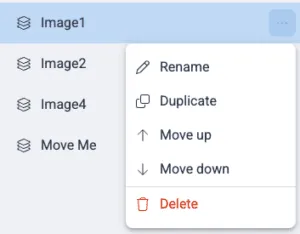
      • A new submenu was added to delete, duplicate and reorder widgets.
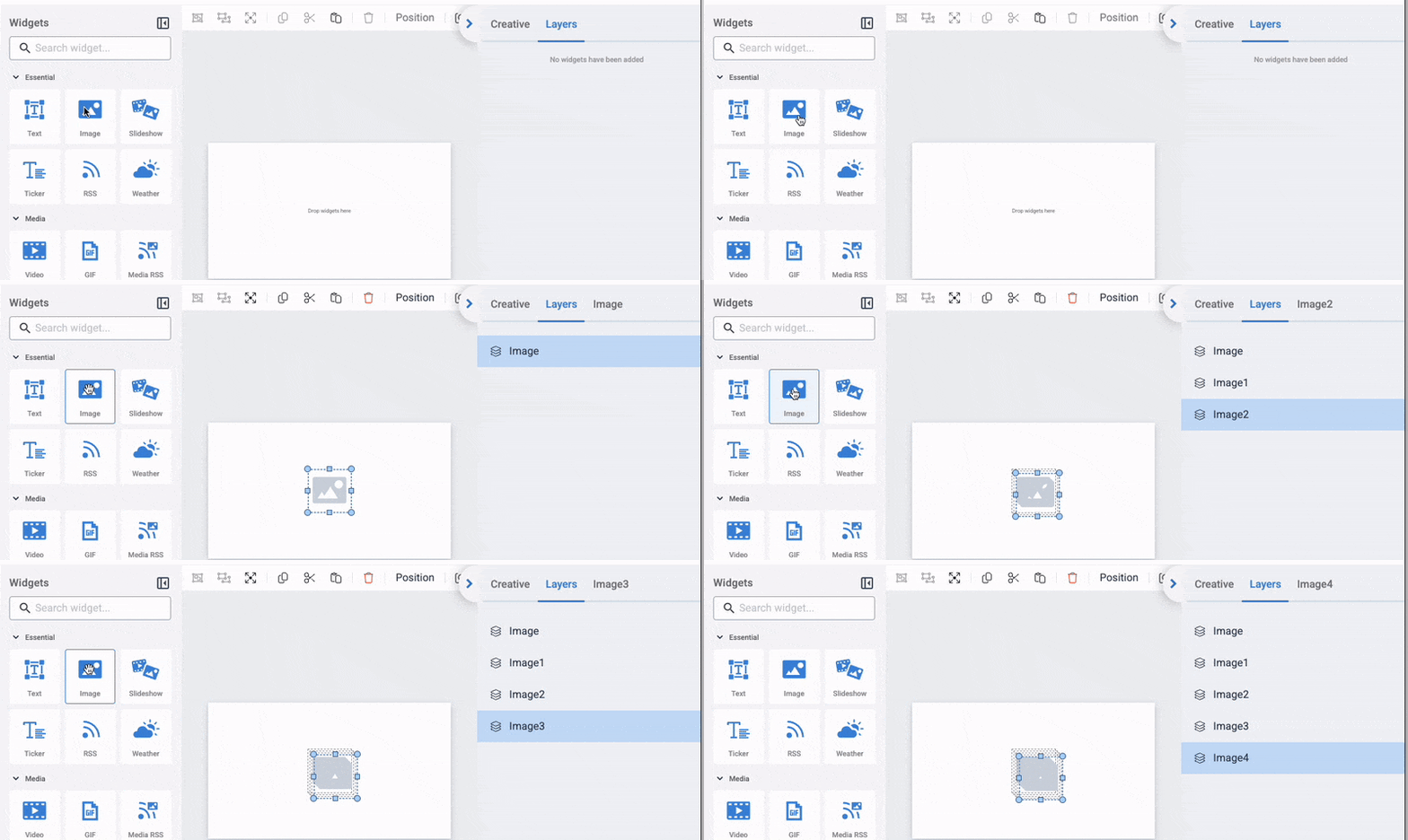
      • Sequential numbers that indicate the order of layers (e.g., 01, 02, 03) allowing you to quickly locate a layer within a stack.

        .

  • Ad-Serving/Programmatic:
    • The ad-serving widget now supports Hivestack (Note: Requires an updated version. Please contact us to ensure your device is compatible.)
  • Playlists:
    • Added an action (Duration) to the Action-menu of a Playlist creation
  • Media Enhancements:
    • Added the ability to add images from Media Center by using the API. This adds support for different scenarios like placing a logo based on API response or account ID.

Notable Bug Fixes and Improvements

  • Fixed an issue where “N/A” sometimes appear next to the plan under the account settings
  • Fixed a rare issue where creatives sometimes disappeared from the studio

Dec 24, 2024

Studio Release 11

New Features

  • Usability:
    • New options have been added to the Player Orientation Settings. This update enables support for portrait screens on Android devices that do not natively support portrait mode. (Note: Requires an updated Android version. Please contact us for details.)
  • Security Enhancements:
    • Added the ability to hide the screen key in URLs for HTML Players, enhancing security.
  • Ad-Serving/Programmatic:
    • The ad-serving widget now supports TAIV.tv. (Note: Requires an updated version. Please contact us to ensure your device is compatible.)
  • Media Enhancements:
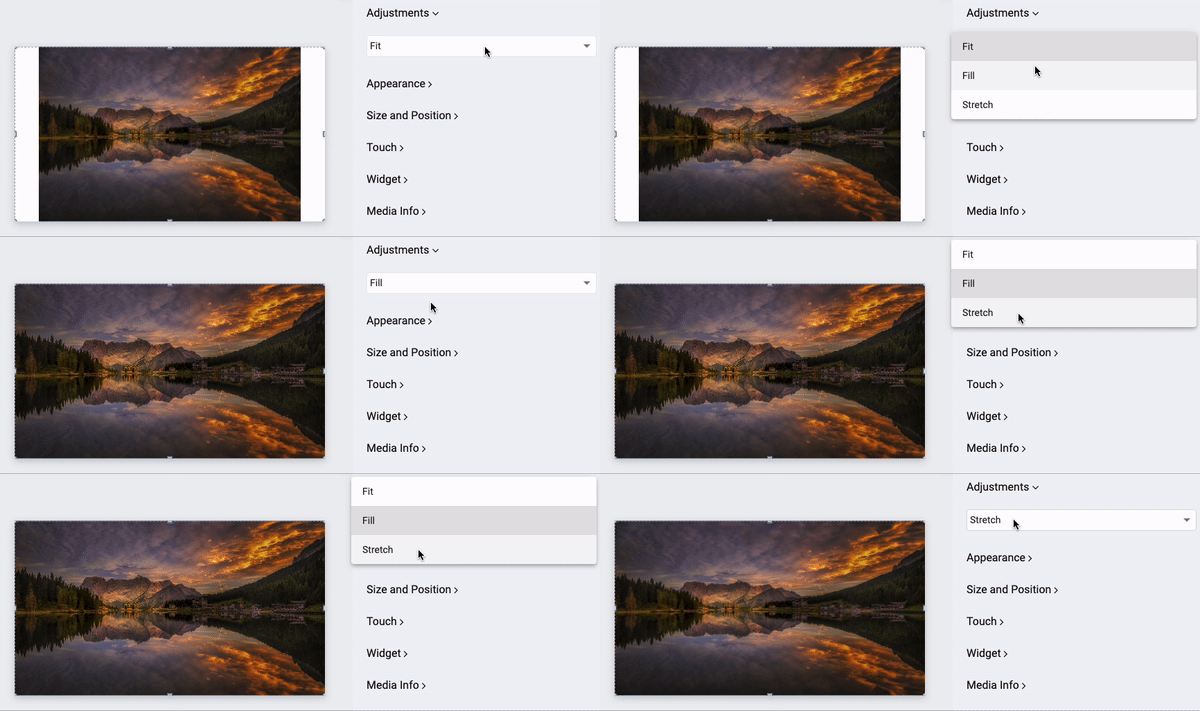
    • Added new display modes for images, including Fill, Fit, and Stretch, allowing greater flexibility in how images are displayed on-screen.
Release 11 1

Notable Bug Fixes and Improvements

    • Improved the top bar of the Studio Composer for a better user experience.

image 20241216 132320

  • Enhanced the creative review process with real-time updates on submission statuses, including stages such as “Submitted for Review” and “Approved.”

Topbar Approvers stage 6

  • Added a new statistics icon to the creative list and tiles, indicating whether statistics are enabled for each creative.

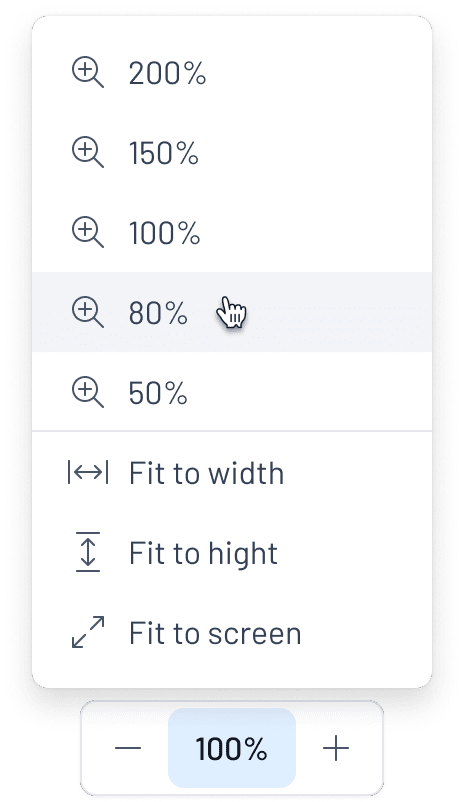
  • The Zoom Control has been optimized to deliver a quick and precision setup experience. This update improves the efficiency of zoom-in/out actions, providing smoother flow and better control when navigating and editing within the interface.

Group 1261152322

  • Improved layers management, including renaming the “Widgets” panel to “Layers” for better clarity.
  • Users can rename the file by clicking on the displayed file name.


Nov 25, 2024

Studio Release 10

New Features

  • Security Enhancements:
    • The screen key is now hidden for HTML Players.
    • SSO is now supported for web players.
  • Calendar Widget: Outlook/Google now support hiding past events and showing only future events.
  • Usability: Folders are now available for Playlists and Screens.

Notable Bug Fixes and Improvements

  • YouTube: Fixed an issue when an error was displayed for some playlists.
  • Multi-lingual: Added missing translations for all supported languages.
  • The embedded HTML Widget was deprecated.
  • “Custom API” was renamed “API.”
  • Improved widgets positioning when adding widgets using a single click.
  • Many improvements were made to the composer action toolbar:
    • The undo/redo buttons were moved to a more prominent position next to the settings button.
    • The grid was moved from the toolbar to the editor preferences.
    • New styles, layout, and functionality for the editor toolbar.
  • The account menu sub-menus positioning was improved.
  • The banner notifying users about trial license limitations was improved.

Oct 28, 2024

Studio Release 9

New Features

  • Media File Deletion Confirmation: A confirmation dialog is now displayed when attempting to delete media files linked to creatives, helping to prevent accidental deletion.
  • Account Menu Updates:
    • The Solutions section is now hidden in the Account Menu when no solutions are available.
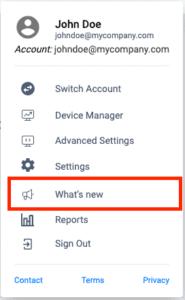
    • A new What’s New item has been added, providing a direct link to the latest product updates.
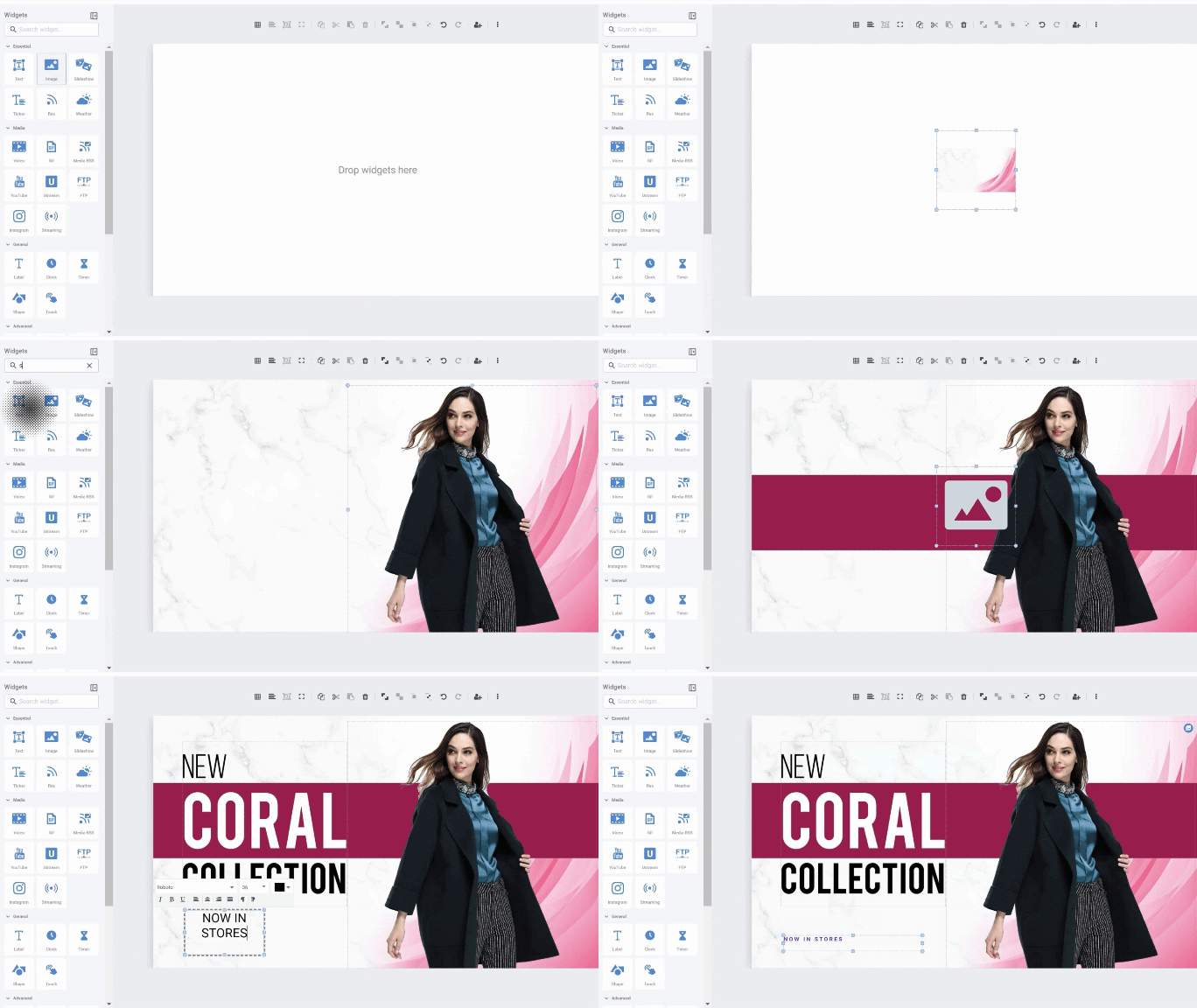
  • One-Click Widget Additions: Users can now add widgets to the canvas with a single click, in addition to the existing drag-and-drop functionality.

Notable Bug Fixes and Improvements

  • Improved Widget Error Messages: Enhanced location of error messages inside widgets.
  • API Test Button Fix: Resolved an issue where the test button in the studio API returned errors.
  • HDMI Indicator Removal: The “Unplugged HDMI” indicator in the device manager screen has been removed for web players, streamlining the user experience.

Oct 14, 2024

Windows Player 6.0.7-2 Release

New Features

  • Improved Web Page Rendering (Embedded URL)
  • Major improvements to the widget positions.
  • Shapes widgets were added to support all current studio shapes.

Notable Bug Fixes and Improvements

    • Fixed an issue where multiple widgets were not displayed
  • Fixed an issue that caused the app to crash when updating content
  • Improved the web video widget to work also when there is one creative
  • Fixed an issue where the screen content stops after a few seconds with a “screen was removed remotely” message
  • Fixed an issue when renaming the device, and deleting it, it appears in the studio.
  • The internal web browser was upgraded
  • Fixed an issue where screen content was changed to the old one on Stop/Go

Sep 19, 2024

Studio Release 8

New Features

  • Delphi by Amadeus Integration: Businesses can now automatically import event data to display dynamically in the lobby, showing a list of all events on Room Signs and Wayfinding displays. This feature helps visitors quickly locate their meeting rooms.
  • BrightSign Support: Content can now be displayed on BrightSign players, expanding device compatibility.
  • Studio Composer – Enhanced Widgets Panel: We’ve improved the Widgets Panel by adding labels to the icons, grouping related elements, and introducing a search bar to enhance accessibility and user- friendliness.

Major Bug Fixes

  • Audit Logs for Partner’s Custom Plans: Fixed an issue where audit logs for custom partner plans were not functioning correctly.
  • YouTube Widget: Fixed issues related to playlist.

Aug 19, 2024 On 19-Aug-2024 we released a new version for the Admin tool (Management Console), the online Studio CMS, and the monitoring & reports tool. The new version includes bug fixes and minor changes, so no visual change should be expected..