
Sign up for a free evaluation account
Text Download ➞
Title Subtitle Download ➞

Fix Video Flickering and Transition Issues on Android Devices

Overview

This guide applies to Android-based media players only.

In some cases, you may notice flickering, blinking, or a black flash when transitioning between videos or creatives.

This issue is related to the device’s firmware and video handling, rather than the Android version itself, and may occur on certain Android players.
When does this happen?

You may experience this issue when:

  • Switching between two videos
  • Transitioning from a video to an image (or vice versa)
  • Moving between creatives in a playlist

How to Fix It

Start with the built-in transition settings in the NoviSign player:

  • Open the NoviSign app on your device
  • Go to Settings → Display
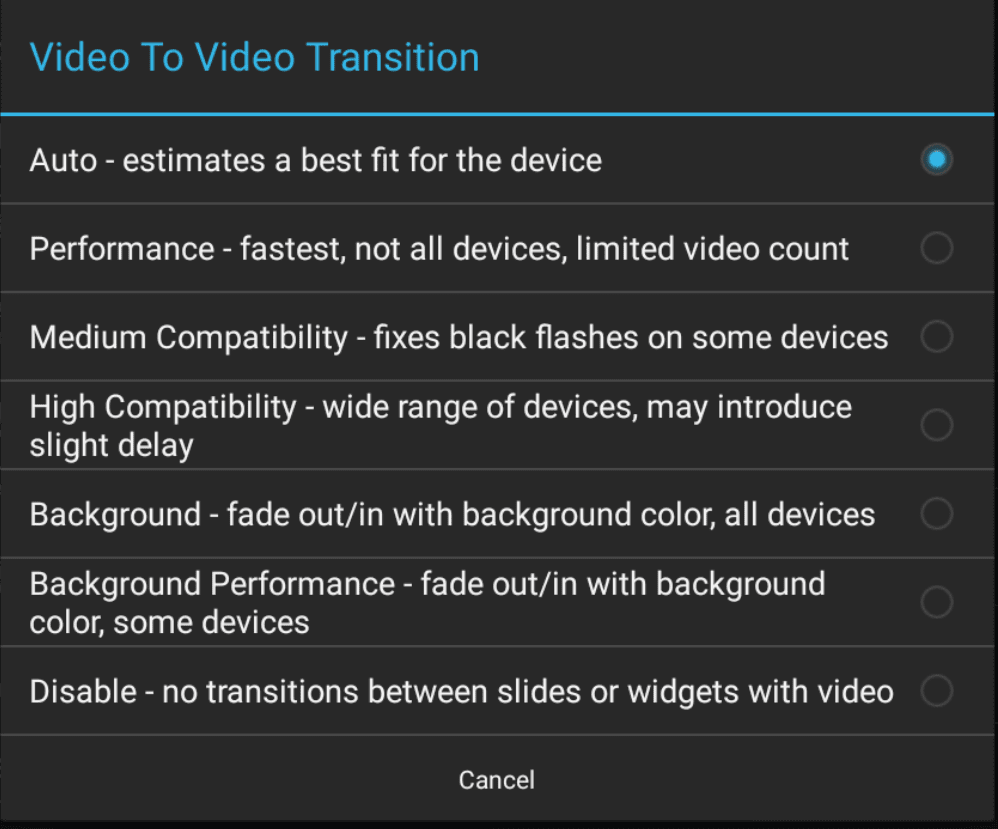
  • Locate Video to video transition
  • Try all available options

Video to video transition

This setting controls how the player transitions between media types and may resolve the issue immediately.

If the issue persists, you can fine-tune the transition behavior:

Step 1: Enable Performance Mode

  • Set Video to video transition to Performance

Step 2: Enable Manual Compensation

  • Go to Settings → Advanced → Video Transitions Tune
  • Turn ON Manual Init Compensation

Step 3: Adjust Buffer Delay

  • Modify the Buffer Delay value (in milliseconds)

Recommended approach:

  • Start with 100 ms
  • Gradually increase (e.g., 120 → 150 → 200 ms)
  • Test playback after each change

Note: This is a trial-and-error process and may vary per device.

What to expect:

  • Lower values → may cause flickering or black flashes
  • Higher values → may show a frozen first frame briefly

The goal is to find the optimal balance for smooth transitions.

Manual Tune

  • Maximum Buffer Delay = 1500 ms
  • Buffer Count usually does not need to be changed (leave default)

In rare situations, the issue may be caused by the device’s display settings:

  • Open Android Settings → Display
  • Look for a setting such as:
    “Self-adaptive refresh rate switching”
  • Change it from Level 2 (or similar) to Off

This may help prevent flickering during playback.

Video transition issues on Android devices are usually device-specific and can be resolved by:

  • Testing different transition modes
  • Fine-tuning buffer delay settings
  • Adjusting device display configurations (if needed)

With a few adjustments, you should be able to achieve smooth, flicker-free playback.

NoviSign Digital Signage
Privacy Overview

This website uses cookies so that we can provide you with the best user experience possible. Cookie information is stored in your browser and performs functions such as recognising you when you return to our website and helping our team to understand which sections of the website you find most interesting and useful.