





No blank canvas. No design skills. No need to build everything element by element.

NoviSign Studio AI
Describe your screen. AI builds it!
Create complete digital signage screens in seconds with NoviSign's AI studio.
Get prompt inspiration for whatever you’re creating:
Ratings
Your Idea is enough.

Tell NoviSign AI Studio what you want, and it creates the screen for you: layout, content, images and screen elements. One prompt. A complete screen.

AI Studio is built right into NoviSign Studio. Everything it creates is ready to refine, manage and publish immediately, with no separate tool to learn.
- Describe your screen
- AI starts building
- Sections & content added
- Ready to edit & publish
- Create your screen up to 10× faster
- Every element stays editable
- Anyone can be a content creator
Turn my idea into a screen
Free for 30 days. No credit card required.
-

-
-
-
-
SOC 2 Type II Certified
Every element stays editable
Create it, change it – Make it yours!
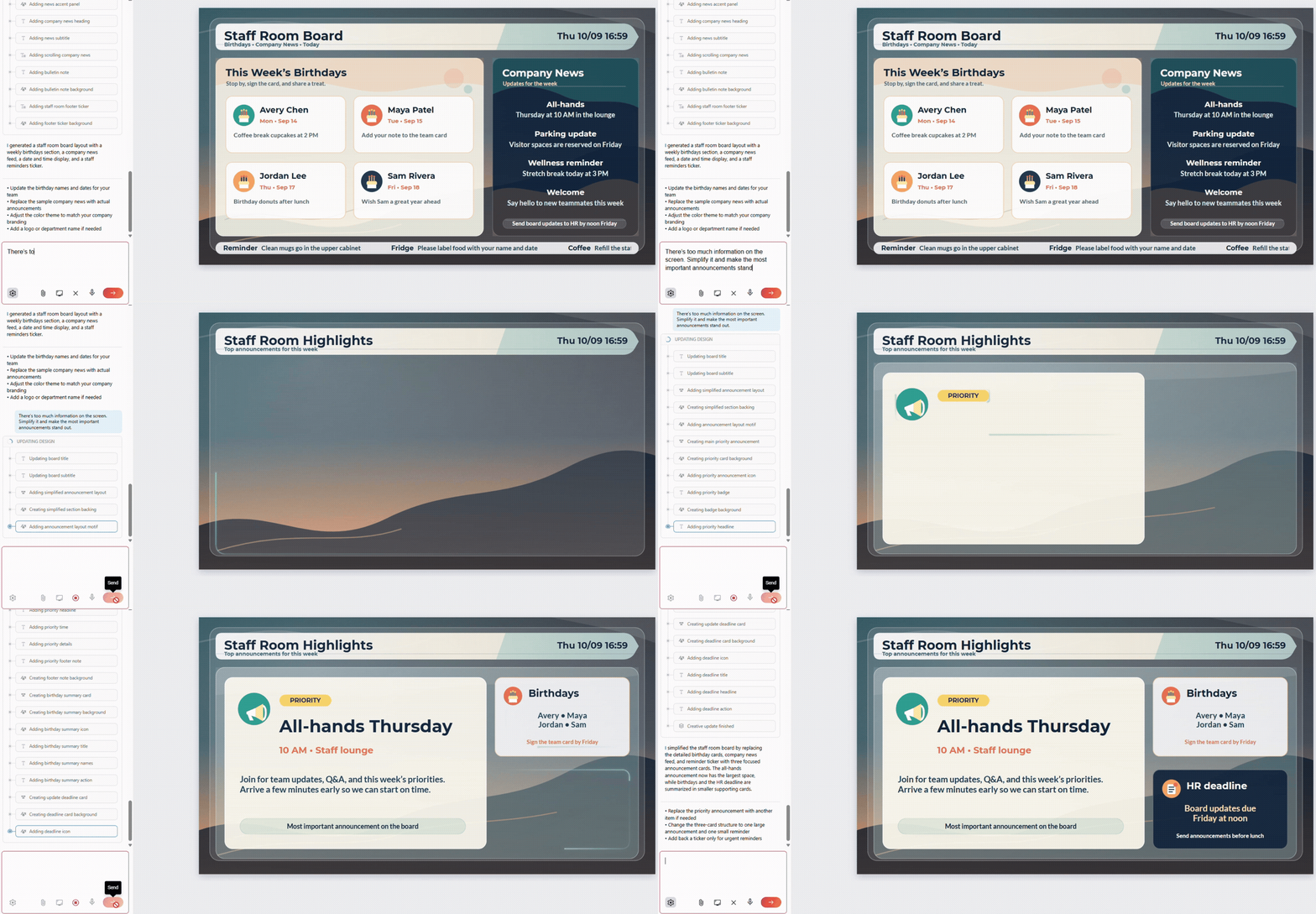
NoviSign AI Studio isn’t only for creating new screens. It works on any creative, new or existing.
Instead of finding and editing every element manually, simply tell AI Studio what needs to change.
Instead of finding and editing every element manually, simply tell AI Studio what needs to change.
Prompt:
There’s too much information on the screen. Simplify it.
Prompt:
Change the Margherita to $12.99 and the Family Combo to $29.99.
Prompt:
Replace today’s event with Parent Night at 6:30 PM.
The AI chat panel stays open next to your screen. Keep asking for changes, or click into any element and edit it directly with standard NoviSign Studio tools.

Prefer to make the changes yourself? Go ahead. Everything NoviSign AI Studio creates remains fully editable, exactly as you’d expect from NoviSign Studio.
Ready to create your first screen?
See what NoviSign AI Studio can create
from just one prompt.
Try it now
Free for 30 days. No credit card required.
Connect AI to your digital signage with MCP
AI that goes beyond content creation
NoviSign’s AI capabilities go beyond creating content. With Model Context Protocol (MCP), NoviSign can connect AI with your tools and data sources to enable smarter workflows, automation and real-time screen updates.

Connect AI to
your signage
Connect NoviSign with MCP-enabled AI services.

Automate
workflows
Use AI to help manage content, playlists and screen updates.

Connect
your data
Bring external tools and business information into your signage workflows.
Choose
your AI
Use the AI provider that works for your organization.

Generate Images with Just a Few Words
With the AI Image Creator, a key feature of our AI powered digital signage platform, you can describe your vision in simple terms and instantly receive a relevant, professional-grade image—ready to be added to your creative or playlist.
- Open the AI Image Creator from the
Media Center - Type a short description like “sunset over mountains” or “freshly baked pizza with cheese.”
- Click Generate Image—our AI in digital signage will create a unique visual based on your input.
- Click Add Image to insert it directly into your digital signage content.

Prompt:
$12.95 freshly baked pizza with cheese and basil..
This feature is perfect for creating eye-catching visuals
Prompt:
Generate an image of a smash burger with cheese and pickle and ingredients flying

Prompt:
Generate an image of a breathable shoe with fire coming out of its heels

Prompt:
Generate an image of a Christmas oriented fire place

FAQ
The 30-day trial comes with all widgets and capabilities. You don’t need to enter a credit card to get started. The only item that is limited is the cloud storage at 80 MB and max file upload size at 16 MB
With NoviSign signage software create an unlimited number of templates and screen layouts. Add live news, and RSS feeds, custom scrolling text, dynamic media arrangements, full-screen weather forecasts, live web zones, and more.
Our brand new 100% free template library includes a rising collection of digital signage templates that you can easily customize and use.
- Corporate Communications
- Digital Menu Boards
- Lobby and Digital Directories
- Hospitals & Healthcare
- Retail
- Advertising
- Schools and Educations
- Real Estate
- Hotels
- Nail, Hair, & Beauty
You can remotely manage your digital signage content from any browser, at any time and wirelessly send updates to your screen. NoviSign’s digital signage software allows you to update as many screens as you wish from anywhere.
- From any computer at any time update your screens
- Within minutes of making an update the content updates
- Use any TV, digital sign, Android tablet, kiosk or screen
Within a click, schedule your templates to automatically play on specific times, set regular schedules and or expiration times. Preview your playlist and send it to your digital signage screens.
- Create schedules from your computer
- Send updates to one or groups of digital signs
- Content caches for offline play
- Updates go-live on the digital sign within minutes
Once you have your digital signage playing you can view the status of all your screens, see when the last update occurred, run proof of play reports and more.
- Run detailed media statistic reports
- View high-level player and screen status
- See what playlist is on what screen
- The time of last content download
- Online connectivity of player
With NoviSign digital signage, you can use any brand or size. It doesn’t have to be smart TV either