Groups in NoviSign Studio
Overview
The Groups feature in NoviSign Studio allows you to organize multiple screens and playlists into one place for easier management.
Instead of assigning content to each screen individually, you can group screens together and manage them more efficiently.
This is especially useful when:
- You manage multiple screens in the same location
- You want to assign the same playlist to several screens
- You need a more organized structure for large deployments
How to Access Groups
To access Groups in Studio:
- Click your profile icon (top right)
- Go to Advanced Settings
- Select Groups
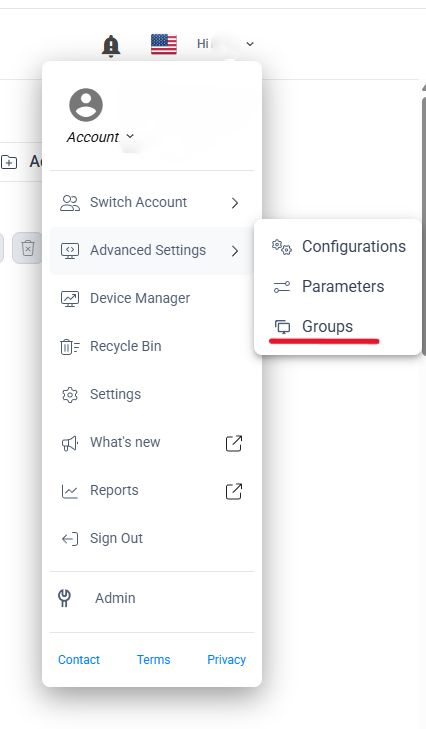
Creating a New Group
To create a group:
- Click + New Group
- Enter a Group Name
- (Optional) Add Tags to help categorize the group
- Add:
- Click Create

Managing Groups
From the Groups page, you can:
- Search for groups
- Edit selected group
- Delete selected group
- Duplicate a group
- Export / Download group data
- Manage tags
To perform these actions:
- Select a group using the checkbox
- Use the action icons at the top of the page
To edit a specific group directly:
- Locate the group in the list
- Click on the three dots (⋯) on the right side
- Select Edit
How It Works
Within a group, you can:
- Add multiple screens
- Assign one or more playlists
- Manage content centrally
Once configured, the playlists assigned to the group will be applied to all screens inside that group.
Groups help simplify content management by allowing you to control multiple screens at once. This saves time, reduces manual work, and ensures consistency across your displays.