This guide provides a step-by-step walkthrough on how to configure your ad campaign using your Place Exchange account.
Place Exchange is a third-party ad-serving platform that enables you to manage and deliver programmatic advertising campaigns across digital screens.
Using NoviSign’s Ad Widget, you can integrate Place Exchange and display your ads seamlessly within your playback content.
Before you begin:
Make sure you have an active Place Exchange account and that your campaign is already configured on their platform.
1. Create a Creative
- Log in to your NoviSign Studio
- Go to the Creatives tab
- Click + New Creative
- Choose a template or start with a blank page
2. Add the Ad Widget
- In the Creative Composer, drag the Ad Widget onto the canvas
- Resize and position it as needed
3. Select Place Exchange Vendor
- In the left panel, open the Ad Serving tab
- From the Vendor dropdown, select PlaceExchange
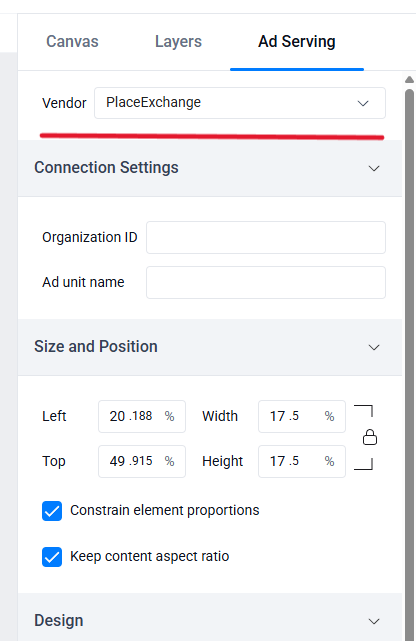
4. Configure Connection Settings
Under Connection Settings, enter the following:
- Organization ID – Your Place Exchange account identifier
- Ad unit name – The specific ad unit defined in your Place Exchange campaign
These values must match exactly what is configured in your Place Exchange account.
5. Save Your Creative
- Click Save to apply the configuration
Note: Without saving, the ad content will not load during preview or playback.
6. Preview the Campaign
- Click Preview at the top
- If your campaign is active, ads will appear inside the widget
This helps verify that everything is correctly configured.
7. Add to Playlist
- Exit the editor
- Add the creative to any playlist
Tip: You can reuse this creative across multiple playlists or screens.
By connecting Place Exchange with NoviSign’s Ad Widget, you can deliver programmatic ads alongside your regular content. This allows for flexible campaign management and efficient monetization of your screens.