Generate API Keys from Account Settings
Overview
NoviSign allows eligible users to generate an API key directly from the Studio. The API key is used to authenticate requests when connecting NoviSign with external systems, APIs, and third-party integrations.
This feature enables developers and system integrators to securely connect NoviSign to external data sources and automate workflows such as updating content, managing screens, or integrating with external platforms.
What Is an API Key
An API key is a unique authentication token that allows external applications to securely communicate with the NoviSign API.
Using an API key, you can:
-
Connect NoviSign with external data sources
-
Automate content updates
-
Integrate NoviSign with third-party systems
-
Build custom applications that interact with NoviSign
For more information about NoviSign API capabilities, see the API dedicated section.
Supported Plans:
The ability to generate an API key from the Studio is available for eligible NoviSign plans: Business Plus and Premium Plans.
How to Generate an API Key
Follow these steps to generate your API key in NoviSign Studio.
Step 1 — Open Account Settings
-
Log in to NoviSign Studio.
-
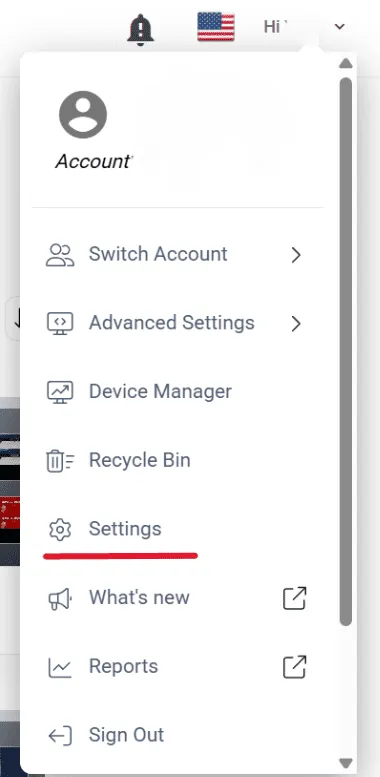
Click your profile menu in the top-right corner of the screen.
-
Select Settings.
Step 2 — Open the API Keys Tab
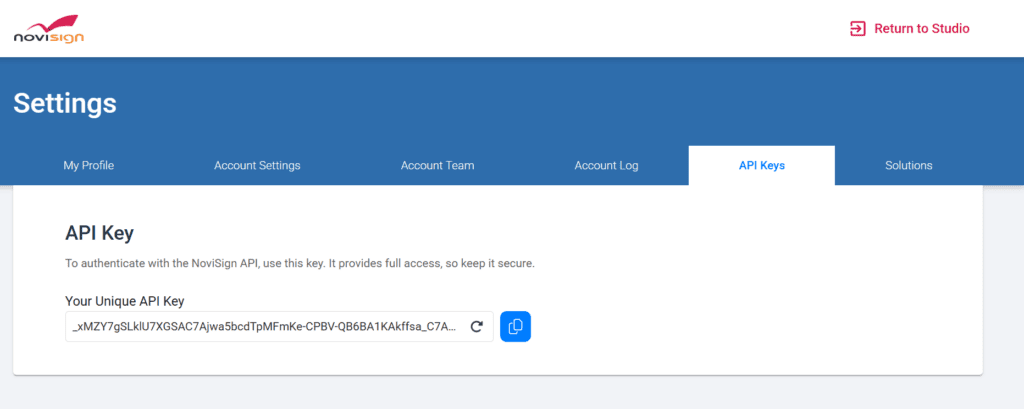
Within the Settings page, click the API Keys tab.
Here you will find your unique API key, which can be used to authenticate API requests.
Step 3 — Copy Your API Key
Click the copy icon next to the key field to copy the API key to your clipboard.
You can now use this key when connecting NoviSign to external services or applications.
Important note: The API key provides access to your NoviSign account through the API and should not be shared publicly.If your key becomes exposed or compromised, you can regenerate a new API key from the same page.